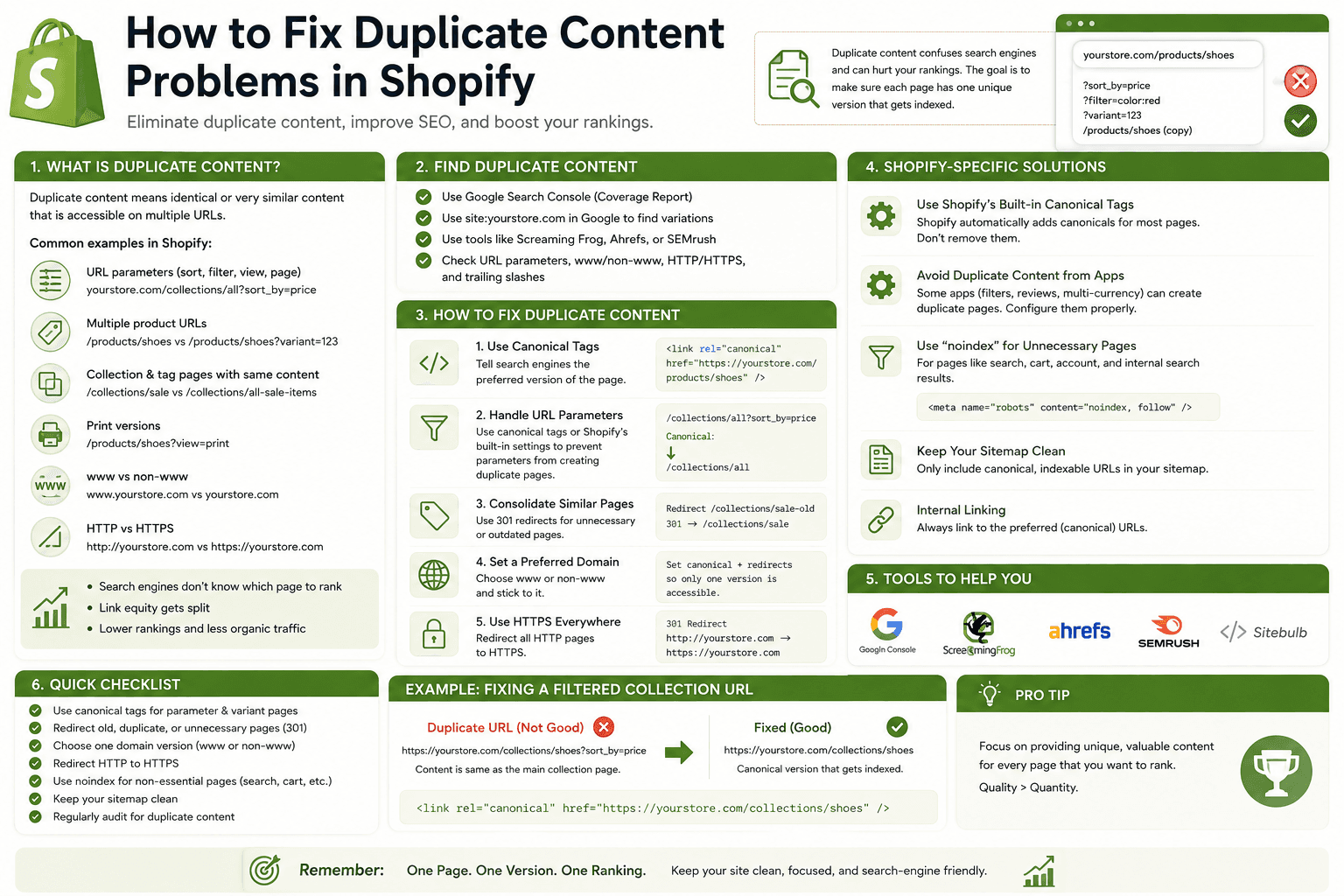
Duplicate content is one of the most confusing technical SEO topics for Shopify store owners.
You may discover that the same product can appear through multiple collection URLs, filtered pages can create different URL variations, and similar products may contain almost identical descriptions.
This can make it difficult to understand which URLs search engines should focus on.
The good news is that seeing the same product through multiple Shopify URLs does not automatically mean your store has a serious SEO penalty.
The important task is to understand why the duplicate URLs exist, whether they provide unique value, and which version should be treated as the preferred URL.
In this guide, we'll explain what duplicate content means, why it can happen in Shopify, how product and collection URLs work, how canonical URLs help, how to handle filters and parameters, how to deal with duplicate product descriptions, and how to troubleshoot duplicate content problems without making unnecessary changes to your store.
Why Shopify Store Speed Matters
What Is Duplicate Content?Duplicate content means substantially similar or identical content appears at more than one URL.
For example, imagine the same product is accessible through:
/products/leather-laptop-sleeve

/collections/laptop-accessories/products/leather-laptop-sleeve

/collections/leather-products/products/leather-laptop-sleeve
The product itself is the same, but the URLs are different.
This is one of the reasons ecommerce websites need careful URL and canonicalization strategies.
Why Shopify Store Speed Matters
Is Duplicate Content a Shopify Penalty?Duplicate content should not automatically be treated as a "penalty."
Search engines can encounter duplicate or near-duplicate URLs for many legitimate reasons, especially on ecommerce websites.
The more important questions are:
- Which URL is the preferred version?
- Can search engines discover the preferred URL?
- Are important pages internally linked correctly?
- Are unnecessary URL variations creating crawl waste?
- Does the content provide unique value?
Don't make major technical SEO changes simply because a crawler reports that two URLs contain similar content.
Why Shopify Store Speed Matters
Why Shopify Stores Can Have Duplicate URLsEcommerce websites naturally create multiple paths to the same products.
Common sources include:
- Product URLs
- Collection product URLs
- Collection filters
- Sorting parameters
- Search URLs
- Product variants
- Tracking parameters
- Duplicate product descriptions
- Old product URLs
- App-generated URLs
Why Shopify Store Speed Matters
Shopify Duplicate Content ChecklistBefore changing anything, review:
- Canonical URLs
- Product URLs
- Collection URLs
- Internal links
- Redirects
- Filtered URLs
- URL parameters
- Product descriptions
- Variant handling
- Pagination
- Search pages
- Third-party app URLs
- Indexing status
- Sitemap URLs
Why Shopify Store Speed Matters
1. Understand Shopify Product URLsA Shopify product normally has a primary URL similar to:
/products/leather-laptop-sleeveHowever, when a product is accessed through a collection, you may also encounter a URL containing the collection path.
/collections/laptop-accessories/products/leather-laptop-sleeveThe product itself hasn't changed.
The navigation path has changed.
This is one reason canonical URL handling is important for Shopify stores.
Why Shopify Store Speed Matters
2. Understand Canonical URLsA canonical URL tells search engines which URL should generally be treated as the preferred version when multiple URLs represent the same or substantially similar content.
Conceptually, a product page might contain:
<link
    rel="canonical"
    href="https://example.com/products/leather-laptop-sleeve"
/>
The canonical URL points search engines toward the preferred product URL.
Canonicalization is therefore an important part of Shopify technical SEO.
Why Shopify Store Speed Matters
3. Don't Remove Canonical Tags Without Understanding ThemOne of the biggest mistakes developers make is deleting a canonical tag because they don't understand why it exists.
If your Shopify theme already has appropriate canonical handling, don't replace it with custom logic without first understanding the current implementation.
A canonical tag is not automatically a problem.
Why Shopify Store Speed Matters
4. Check the Canonical URL of Important ProductsPick several important products and inspect their rendered HTML.
Check whether the canonical points to the product URL you actually want search engines to use.
For example:
Preferred:

/products/leather-laptop-sleeve

Not preferred:

/collections/laptop-accessories/products/leather-laptop-sleeve
The exact implementation depends on your theme and store setup.
Why Shopify Store Speed Matters
5. Don't Canonicalize Every URL to the HomepageA common mistake is adding the homepage as the canonical URL for many pages.
For example:
Product page
    ↓
Canonical
    ↓
Homepage
This is usually not an appropriate solution for a genuine product page.
A product should generally have a canonical URL representing that product when the product page is the preferred version.
Why Shopify Store Speed Matters
6. Use Self-Referencing Canonicals AppropriatelyA page can generally identify itself as the canonical version when there isn't another preferred duplicate URL.
Conceptually:
/products/running-shoes
        ↓
canonical
        ↓
/products/running-shoes
This can make the preferred URL explicit.
Why Shopify Store Speed Matters
7. Avoid Conflicting Canonical SignalsYour site can provide search engines with multiple signals about which URL should be preferred.
Problems can occur when these signals disagree.
For example:
Canonical:
URL A

Internal links:
mostly point to URL B

Sitemap:
URL C

Redirect:
URL D → URL A
The more consistently your technical signals point toward the preferred URL, the easier your site architecture is to understand.
Why Shopify Store Speed Matters
8. Keep Internal Links ConsistentInternal links are important signals for ecommerce sites.
If your preferred product URL is:
/products/leather-laptop-sleeveuse that URL consistently where practical instead of linking to unnecessary alternate paths.
This can reduce confusion and create a cleaner internal linking structure.
Why Shopify Store Speed Matters
9. Link Directly to Product URLs Where AppropriateIf a blog article discusses a product, link directly to the product URL:
/products/leather-laptop-sleeverather than intentionally sending the user through an unnecessary collection path.
This creates a straightforward relationship between informational content and the commercial page.
Why Shopify Store Speed Matters
10. Understand Collection Product PathsShopify collections create useful navigation paths, but developers should understand how those paths relate to the canonical product URL.
A product can belong to multiple collections while remaining one product.
Product
│
├── Collection A
├── Collection B
└── Collection C
This is normal ecommerce architecture.
Why Shopify Store Speed Matters
11. Don't Delete Collections Just Because Products Appear in Multiple CollectionsA product belonging to multiple relevant collections is not automatically an SEO problem.
Collections serve an important purpose for:
- Navigation
- Product discovery
- Category SEO
- Merchandising
The goal is to make the architecture logical rather than eliminate useful category relationships.
Why Shopify Store Speed Matters
12. Check Filtered Collection URLsShopify stores with product filtering can create URLs containing filter parameters.
For example:
/collections/shoes?filter.v.availability=1Other filters may create additional URL variations.
A large catalog can therefore generate many possible combinations.
Why Shopify Store Speed Matters
13. Don't Automatically Index Every Filter CombinationImagine a store has:
10 colors
8 sizes
5 brands
4 materials
The possible combinations can quickly become enormous.
Most combinations won't deserve their own organic landing page.
Decide which filtered pages provide genuinely useful, unique search value.
Why Shopify Store Speed Matters
14. Distinguish Useful Faceted Pages From Low-Value URLsA filtered page can sometimes represent meaningful search intent.
For example:
Women's Waterproof Hiking Bootsmay be a meaningful category for a particular store.
But a random combination such as:
Red + Size 7 + Brand X + Under $73 + In Stockmay not deserve a dedicated search landing page.
Treat faceted navigation as a deliberate SEO strategy rather than letting every combination become an indexable page.
Why Shopify Store Speed Matters
15. Review URL ParametersParameters can appear for several reasons:
- Filtering
- Sorting
- Tracking
- Marketing campaigns
- App functionality
Not every parameter URL needs to be treated as a separate SEO page.
First identify why the parameter exists and whether it changes the meaningful content of the page.
Why Shopify Store Speed Matters
16. Don't Create SEO Pages From Tracking ParametersMarketing parameters can produce URLs such as:
/products/running-shoes?utm_source=newsletterThe tracking parameter doesn't represent a new product.
Don't create separate content or indexable landing pages simply because tracking parameters are attached to URLs.
Why Shopify Store Speed Matters
17. Watch Out for Sorting URLsCollection sorting can create different URL states.
Examples may include:
Featured
Price: Low to High
Price: High to Low
Newest
These different views don't necessarily represent different SEO landing pages.
Make sure your site's technical setup handles these variations appropriately.
Why Shopify Store Speed Matters
18. Avoid Creating Duplicate CollectionsAnother common issue is creating multiple collections containing almost exactly the same products.
For example:
/collections/mens-shoes

/collections/mens-shoes-online

/collections/best-mens-shoes
If all three pages contain essentially the same products and content, you may have created unnecessary duplication.
Build collections around genuine differences in products or customer intent.
Why Shopify Store Speed Matters
19. Give Important Collections Unique ContentA strong collection page should explain what makes that category useful.
For example, a hiking boot collection might discuss:
- Terrain
- Water resistance
- Materials
- Fit
- Support
This makes the page more useful than a simple product grid with a repeated generic paragraph.
Why Shopify Store Speed Matters
20. Avoid Copying the Same Collection Description EverywhereSuppose you have five collections with this description:
Shop our high-quality products at affordable prices.
We offer a wide selection for every customer.
The description provides almost no category-specific information.
Instead, write content that explains what makes each collection different.
Why Shopify Store Speed Matters
21. Fix Duplicate Product DescriptionsProduct duplication isn't always caused by URLs.
Stores that sell products from manufacturers often copy the exact same description provided by the supplier.
This can result in many products across different websites having substantially similar descriptions.
Where practical, create original descriptions that add useful information.
Why Shopify Store Speed Matters
22. Don't Add Filler Just to Make Product Descriptions UniqueMaking every product description different doesn't mean adding meaningless sentences.
Useful original information could include:
- Product-specific features
- Compatibility information
- Use cases
- Care instructions
- Specifications
- Buying considerations
- Original photography
- Frequently asked questions
Why Shopify Store Speed Matters
23. Handle Similar Products CarefullySome stores sell products that are almost identical except for a minor attribute such as color.
Before creating separate SEO strategies for every variation, ask whether each page provides a genuinely useful reason to exist.
Product variants don't automatically need separate SEO pages.
Why Shopify Store Speed Matters
24. Don't Create Separate Pages for Every Color Without a ReasonImagine a shirt comes in:
Black
White
Blue
Green
Red
Creating five nearly identical product pages may not provide additional value if the differences are only color selections.
In many cases, keeping the variations together as one product is simpler and more useful.
Why Shopify Store Speed Matters
25. Watch for Duplicate Pages Created by AppsThird-party Shopify apps can sometimes introduce additional URLs, pages, widgets, or content.
Examples include:
- Review pages
- Wishlist pages
- Search pages
- Landing pages
- Product comparison pages
- Subscription pages
If a crawler discovers unexpected URLs, identify which application or theme component created them before changing your SEO settings.
Why Shopify Store Speed Matters
26. Check Search Result PagesInternal search pages can produce many URLs based on different queries.
For example:
/search?q=running+shoesand:
/search?q=black+running+shoesThese are useful for visitors, but they don't automatically need to become organic search landing pages.
Review how internal search URLs are handled by your store.
Why Shopify Store Speed Matters
27. Don't Turn Internal Search Into a Keyword StrategyCreating hundreds of indexable search-result pages is not a shortcut to ranking for more keywords.
Focus your SEO strategy on useful, intentionally created pages.
Why Shopify Store Speed Matters
28. Check Pagination CarefullyLarge collections may have multiple pages:
/collections/shoes

/collections/shoes?page=2

/collections/shoes?page=3
These URLs represent different portions of the product catalog.
Don't assume that every paginated page is a duplicate simply because the template is similar.
The important thing is that pagination provides a useful, understandable navigation system.
Why Shopify Store Speed Matters
29. Avoid Accidentally Hiding Important ProductsTechnical SEO changes should not make important products difficult for users or crawlers to discover.
Before changing collection filters, pagination, or navigation, verify that important product URLs remain accessible through normal site architecture.
Why Shopify Store Speed Matters
30. Use Redirects When URLs Truly Need to ChangeIf a product or collection URL has permanently changed, a redirect can help send users and relevant signals from the old URL to the new destination.
For example:
/products/old-product-name
        ↓
/products/new-product-name
Don't create redirects simply because two pages have similar content. First determine whether the pages actually represent the same resource.
Why Shopify Store Speed Matters
31. Don't Redirect Every Old Product to the HomepageWhen a product is discontinued, sending every old URL to the homepage may provide a poor experience.
Consider whether there is a relevant replacement product or collection instead.
The redirect destination should make sense to the visitor.
Why Shopify Store Speed Matters
32. Handle Discontinued Products CarefullyWhen a product is permanently unavailable, consider:
- Whether it has organic traffic
- Whether it has backlinks
- Whether a replacement exists
- Whether the page can remain useful
- Whether a relevant category is available
The right approach depends on the circumstances.
Why Shopify Store Speed Matters
33. Check Your SitemapYour sitemap should help search engines discover the URLs that matter.
If your site architecture contains many unnecessary URL variations, review whether the important canonical pages are being surfaced consistently.
Don't assume that appearing in a sitemap automatically means a page should rank. Sitemap inclusion is one signal among many.
Why Shopify Store Speed Matters
34. Make Internal Links Match Your Preferred URLsIf your canonical product URL is:
/products/leather-walletuse that URL consistently in:
- Blog posts
- Navigation
- Related product sections
- Custom sections
- Promotional banners
Consistency makes your site's internal architecture cleaner.
Why Shopify Store Speed Matters
35. Don't Use Canonical Tags as a Replacement for EverythingCanonical tags are useful, but they aren't a universal solution for every duplicate URL problem.
Depending on the situation, you may also need:
- Better internal linking
- Redirects
- Improved content
- Better collection architecture
- Filter management
- Removal of unnecessary pages
Choose the solution based on why the duplicate exists.
Why Shopify Store Speed Matters
36. Use the Correct Solution for the ProblemA useful way to think about duplicate content is:
Same content + different URL
        ↓
Canonicalization may help

Old URL + permanent replacement
        ↓
Redirect may help

Unnecessary page
        ↓
Consider removing or de-emphasizing it

Same product description
        ↓
Create more useful original content

Useful unique category
        ↓
Keep and optimize it
The solution should match the underlying problem.
Why Shopify Store Speed Matters
37. Check Duplicate Titles and Meta DescriptionsDuplicate metadata is not exactly the same thing as duplicate page content, but it can indicate that your pages are not differentiated well enough.
Review important product and collection pages for:
- Duplicate title tags
- Duplicate meta descriptions
- Generic product titles
- Repeated collection descriptions
Why Shopify Store Speed Matters
38. Don't Force Every Meta Description to Be Completely Different Just for the Sake of DifferenceImportant pages should have useful search snippets.
But don't waste time creating artificial variations that don't accurately describe the pages.
Relevance and usefulness matter more than simply making every character different.
Why Shopify Store Speed Matters
39. Audit Duplicate Content With Crawling ToolsFor a larger Shopify store, a crawler can help identify:
- Duplicate titles
- Duplicate descriptions
- Canonical inconsistencies
- Multiple URL patterns
- Redirect chains
- Unexpected parameters
Use these tools to identify patterns rather than treating every warning as an emergency.
Why Shopify Store Speed Matters
40. Inspect URLs Manually TooAutomated tools are useful, but they don't understand your business context as well as you do.
When a crawler reports duplicate content, open several examples and ask:
- Are these actually the same page?
- Do users need both URLs?
- Is one URL clearly preferred?
- Is the content intentionally similar?
- Does the alternate page have unique value?
Why Shopify Store Speed Matters
41. Use Google Search Console to Investigate IndexingSearch performance and indexing tools can help you understand how search engines are treating important URLs.
When investigating a problem, compare:
- Preferred canonical
- Google-selected canonical where available
- Indexing status
- Page URL
This can help identify cases where your intended canonical URL and the search engine's selected version don't match.
Why Shopify Store Speed Matters
42. Don't Panic When Google Selects a Different CanonicalIf a search engine selects a different canonical URL than the one you specified, don't immediately assume the site is broken.
Search engines can choose a canonical based on multiple signals.
Instead, investigate why the signals may disagree.
Why Shopify Store Speed Matters
43. Strengthen the Preferred PageIf an important product or collection is the page you want to rank, make its signals consistent.
Consider:
- Internal links
- Canonical URL
- Page content
- Navigation
- Sitemap inclusion
- External links where naturally earned
Why Shopify Store Speed Matters
44. Improve Content Instead of Adding More URLsWhen stores discover duplicate content, the instinct is sometimes to create even more pages targeting additional keywords.
This can make the problem worse.
Instead, ask whether your existing important pages can better satisfy the search intent.
Why Shopify Store Speed Matters
45. Avoid Near-Duplicate SEO PagesA page doesn't have to be literally identical to another page to create a duplication problem.
Near-duplicate pages may have:
- Nearly identical product sets
- Almost identical descriptions
- Minor keyword changes
- Identical templates with little unique content
Before creating a new SEO landing page, determine whether it has a genuine purpose.
Why Shopify Store Speed Matters
46. Create Unique Pages for Genuine Search IntentThere is nothing wrong with having multiple pages when they serve different needs.
For example:
/collections/running-shoes

/collections/trail-running-shoes

/collections/womens-running-shoes
These can represent meaningful differences if the products and content genuinely support those categories.
Why Shopify Store Speed Matters
47. Don't Merge Pages That Should Remain SeparateDuplicate-content cleanup can go too far.
If two pages target genuinely different customer needs, don't merge them simply because they share some products or terminology.
SEO optimization should preserve useful site architecture.
Why Shopify Store Speed Matters
48. Build a Logical Shopify URL StructureA clean ecommerce architecture might look like:
Homepage
    ↓
Collection
    ↓
Product

Blog
    ↓
Article
    ↓
Product / Collection
The exact architecture can vary, but visitors should be able to understand how pages relate to each other.
Why Shopify Store Speed Matters
49. Create a Duplicate Content Audit ProcessFor a larger Shopify store, perform a regular technical audit.
A simple process is:
1. Crawl the site
        ↓
2. Find duplicate URLs
        ↓
3. Group URL patterns
        ↓
4. Identify the preferred URL
        ↓
5. Check canonical tags
        ↓
6. Review internal links
        ↓
7. Review redirects
        ↓
8. Improve unique content
        ↓
9. Check indexing
        ↓
10. Monitor results
Why Shopify Store Speed Matters
50. Don't Fix Duplicate Content BlindlyThis is the most important rule in the entire process.
Duplicate content reports are signals for investigation, not instructions to delete or redirect everything.
Before changing a URL, determine:
- Why the URL exists
- Whether it has users
- Whether it has traffic
- Whether it has backlinks
- Whether it has unique search intent
- Whether another URL is clearly preferred
Why Shopify Store Speed Matters
Common Shopify Duplicate Content ExamplesExample 1: Product Collection Path
/products/black-running-shoes

/collections/running-shoes/products/black-running-shoes
These may represent the same product through different navigation paths.
Review canonical handling and internal linking.
Example 2: Tracking Parameter
/products/black-running-shoes?utm_source=emailThe tracking parameter doesn't create a new product.
Example 3: Filtered Collection
/collections/running-shoes?filter.v.color=BlackDetermine whether this filtered state provides meaningful search value or is simply a browsing variation.
Example 4: Duplicate Product Description
Product A:
"Premium cotton t-shirt designed for everyday comfort."

Product B:
"Premium cotton t-shirt designed for everyday comfort."
If the products are substantially different, the descriptions should provide product-specific information.
Why Shopify Store Speed Matters
How to Fix Shopify Duplicate Content Step by StepIf you suspect your store has duplicate content, follow this process.
Step 1: Identify the Duplicate URLs
Use crawling and search tools to find URL patterns that appear more than once.
Step 2: Group Similar URLs
Don't analyze thousands of URLs individually at first.
Look for patterns such as:
/products/

 /collections/.../products/

 /collections/?filter=

 /search?q=

 ?sort_by=

 ?utm_source=
Step 3: Determine the Preferred URL
For each group, decide which URL should represent the primary page.
Step 4: Review Canonical Tags
Check whether the preferred URL is correctly represented.
Step 5: Review Internal Links
Make sure important internal links point toward the preferred versions where practical.
Step 6: Improve Unique Content
Rewrite thin or copied descriptions where additional useful information can genuinely improve the page.
Step 7: Use Redirects Where Appropriate
Redirect old URLs when they have been permanently replaced and a relevant destination exists.
Step 8: Review Filters and Parameters
Decide which filtered or parameterized URLs should remain useful for users and which should not become unnecessary search landing pages.
Step 9: Recheck Important Pages
After changes, test product, collection, navigation, filtering, and search functionality.
Step 10: Monitor the Results
Technical SEO changes should be monitored rather than assumed to have worked immediately.
Why Shopify Store Speed Matters
Shopify Duplicate Content Mistakes to Avoid- Deleting every duplicate-looking URL
- Canonicalizing every page to the homepage
- Removing canonical tags without understanding them
- Redirecting unrelated pages
- Creating collections for every keyword variation
- Indexing every filter combination
- Copying manufacturer descriptions
- Creating separate pages for every product color unnecessarily
- Ignoring internal search URLs
- Ignoring tracking parameters
- Creating conflicting canonical signals
- Changing established URLs without a plan
- Ignoring third-party apps
- Making technical changes without testing
Why Shopify Store Speed Matters
Shopify Duplicate Content Audit Checklist- Have I identified the actual duplicate URL patterns?
- Do important products have appropriate canonical URLs?
- Are internal links consistent with preferred URLs?
- Are collection paths handled correctly?
- Are filtered URLs creating unnecessary variations?
- Are tracking parameters creating duplicate crawlable URLs?
- Are sorting URLs handled appropriately?
- Are important collections genuinely unique?
- Are product descriptions sufficiently useful and product-specific?
- Are discontinued products handled appropriately?
- Are redirects used only when relevant?
- Are third-party apps creating unexpected URLs?
- Are important canonical URLs discoverable through internal links?
- Have I checked indexing status?
- Have I reviewed the sitemap?
- Have I tested the changes before publishing them?
Why Shopify Store Speed Matters
Frequently Asked QuestionsDoes Shopify have a duplicate content problem?
Shopify stores can naturally produce duplicate or near-duplicate URLs because products can be accessed through collections, filters, parameters, and other navigation paths. This doesn't automatically mean the store has a serious SEO problem. The important task is understanding which URLs are preferred and how the site's signals point toward them.
How do I fix duplicate product URLs in Shopify?
Start by identifying the preferred product URL, then review canonical tags and internal links. Avoid making unnecessary URL changes simply because a product can be reached through multiple navigation paths.
What is a canonical URL in Shopify?
A canonical URL identifies the preferred version of a page when multiple URLs represent the same or substantially similar content. It helps search engines understand which URL should generally be considered the primary version.
Should I redirect duplicate Shopify product URLs?
Not automatically. Redirects are more appropriate when an old URL has been permanently replaced by another relevant URL. If the alternate URL exists as a normal navigation path to the same product, canonicalization and consistent internal linking may be more appropriate.
How do I fix duplicate product descriptions in Shopify?
Where practical, create useful product-specific descriptions that explain features, specifications, compatibility, use cases, care instructions, and other information relevant to that particular product. Don't add meaningless filler just to make descriptions different.
Are Shopify collection filters duplicate content?
Filtered URLs can create multiple variations of a collection page, but they aren't automatically harmful. The important question is whether the filtered page provides meaningful unique value and whether it should be treated as an organic search landing page.
Should I index Shopify filter pages?
Not all filter combinations deserve indexing. Some may represent useful search intent, while many combinations may create low-value pages. Treat filter indexing as a deliberate SEO decision.
Should every Shopify product have a unique description?
Important product pages should provide accurate information specific to those products. Avoid unnecessary duplication, especially when products have meaningful differences that customers need to understand.
Should I remove duplicate pages from Shopify?
Don't remove pages simply because an SEO tool reports duplicate content. First determine whether the page serves a useful purpose, receives traffic, has links, or represents a legitimate part of the store architecture.
Can duplicate content hurt Shopify SEO?
Large amounts of unnecessary duplicate or near-duplicate content can make a website's architecture harder to manage and can create inefficient URL discovery. However, normal ecommerce duplication doesn't automatically mean a ranking penalty. The solution should depend on the type and purpose of the duplicate content.
Why Shopify Store Speed Matters
Final ThoughtsFixing duplicate content in Shopify isn't about making every URL on your website completely unique.
Ecommerce websites naturally create multiple URL variations because products can belong to multiple collections, users can filter and sort products, and marketing systems can add parameters.
The goal is to create a clear and consistent architecture where search engines can understand which pages are important and which URLs are simply alternate ways of accessing the same information.
Start by identifying the source of the duplication. Then review canonical URLs, internal links, redirects, filters, parameters, product descriptions, collections, and third-party applications.
Don't automatically delete pages, redirect everything to the homepage, or add canonical tags without understanding the underlying problem.
For important products and collections, focus on creating genuinely useful content and a logical internal linking structure.
The best Shopify SEO strategy is not about producing thousands of URLs. It is about building a store where the right pages are useful, discoverable, technically accessible, and clearly differentiated.
When your URL structure, canonical signals, internal links, content, and navigation all work together, duplicate content becomes much easier to manage and your Shopify store becomes easier for both users and search engines to understand.