If you're developing Shopify apps or integrations, one of the first API decisions you'll encounter is whether to use the Shopify REST API or GraphQL API.
Historically, Shopify developers used the REST Admin API extensively for products, orders, customers, inventory, themes, and other store operations.
However, Shopify's API strategy has moved strongly toward GraphQL. The REST Admin API became a legacy API on October 1, 2024, and Shopify requires new public apps submitted from April 1, 2025 onward to use the GraphQL Admin API. :contentReference[oaicite:1]{index=1}
This means that if you're starting a new Shopify app today, GraphQL should generally be your starting point.
But REST is still important to understand, especially if you're maintaining an existing integration or migrating an older Shopify application.
In this guide, we'll compare Shopify REST and GraphQL, explain how requests and responses differ, look at rate limits and pagination, discuss practical use cases, and explain which API you should choose for a new Shopify project.
Why Shopify Store Speed Matters
Shopify REST API vs GraphQL API: Quick AnswerIf you're building a new Shopify app, use the GraphQL Admin API.
Shopify identifies the REST Admin API as legacy, and new public apps submitted to the Shopify App Store since April 1, 2025 must use GraphQL. :contentReference[oaicite:2]{index=2}
REST can still matter when you're working with an existing legacy integration that hasn't yet been migrated.
New Shopify App
        ↓
GraphQL Admin API

Existing REST Integration
        ↓
Plan / perform migration

Customer-facing Headless Storefront
        ↓
Storefront API
Why Shopify Store Speed Matters
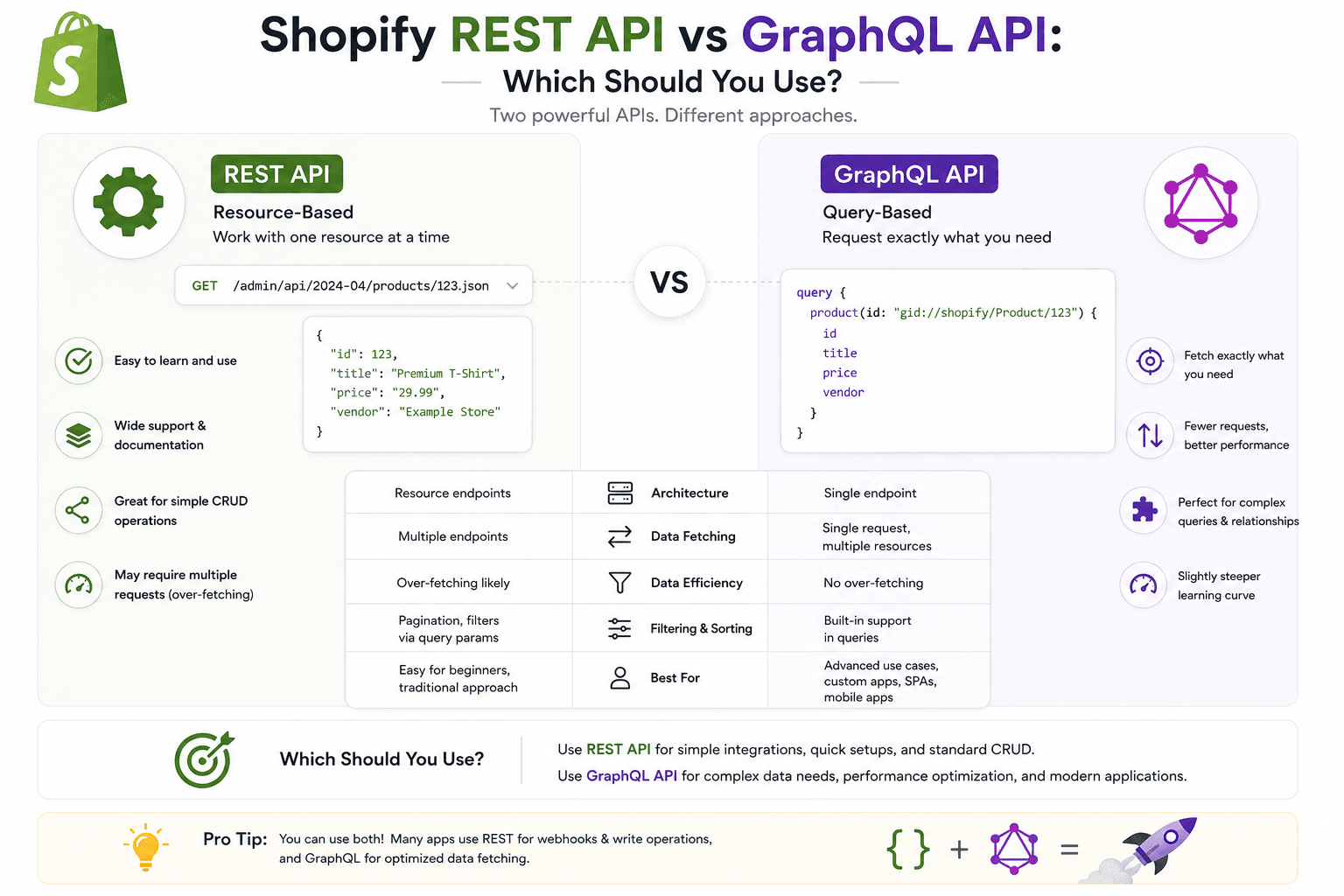
REST API vs GraphQL API: Main Differences| Feature | REST | GraphQL |
|---|---|---|
| API style | Resource-based endpoints | Query-based API |
| Shopify status | Legacy Admin API | Recommended Admin API for new apps |
| Data selection | Defined by endpoint response | Client selects fields |
| Multiple resources | Often requires multiple requests | Can request related data in one query |
| Rate limiting | Request-based | Calculated query cost |
| Pagination | Cursor-based pagination | Connection-based pagination |
| Best use today | Existing legacy integrations | New Shopify apps and integrations |
Why Shopify Store Speed Matters
What Is the Shopify REST API?REST stands for Representational State Transfer.
A REST API organizes functionality around resources and endpoints. Your application makes HTTP requests to specific URLs to retrieve or modify data.
For example, a REST-style application might conceptually work with endpoints such as:
GET    /products.json
GET    /products/{id}.json
POST   /products.json
PUT    /products/{id}.json
DELETE /products/{id}.json
The exact endpoints and available resources depend on Shopify's API version and current API capabilities.
Shopify's REST Admin API is still documented, but Shopify currently labels it as a legacy API. :contentReference[oaicite:3]{index=3}
Why Shopify Store Speed Matters
What Is the Shopify GraphQL API?GraphQL is a query language and runtime that allows clients to specify the data they want from an API.
Instead of calling different endpoints for different resources, a GraphQL client sends a query describing the fields it needs.
A simplified example looks like:
{
  products(first: 10) {
    nodes {
      id
      title
      handle
    }
  }
}
The response contains the requested fields rather than forcing the client to consume an entire predefined REST response.
Shopify identifies GraphQL as its technology of choice for APIs and recommends the GraphQL Admin API for Shopify apps and integrations. :contentReference[oaicite:4]{index=4}
Why Shopify Store Speed Matters
Why Did Shopify Move Toward GraphQL?One major reason is that GraphQL gives applications more control over the data they request.
In a traditional REST workflow, different resources may require different requests.
Imagine your application needs:
- Product title
- Product handle
- Product images
- Inventory information
- Variant information
Depending on the API and resource structure, a REST implementation may require multiple requests or endpoint-specific responses.
GraphQL allows developers to construct a query around the data they actually need.
Why Shopify Store Speed Matters
REST API ExampleA simplified REST workflow could look like:
Request 1
GET /products/123

        ↓

Product data

        ↓

Request 2
GET /products/123/variants

        ↓

Variant data
The exact number of requests depends on the API endpoints and the data your application requires.
Why Shopify Store Speed Matters
GraphQL API ExampleWith GraphQL, related fields can often be requested within one query.
{
  product(id: "gid://shopify/Product/123") {
    id
    title
    handle

    variants(first: 10) {
      nodes {
        id
        title
      }
    }
  }
}
The server processes the query and returns the requested structure.
Why Shopify Store Speed Matters
REST vs GraphQL: Over-FetchingOne common REST API challenge is over-fetching.
Over-fetching happens when an API response contains more information than your application actually needs.
For example, your frontend may only need:
id
title
handle
but an endpoint might return many additional fields.
GraphQL lets the client specify the fields it wants.
Why Shopify Store Speed Matters
REST vs GraphQL: Under-FetchingUnder-fetching happens when one request doesn't provide all the data needed by the application.
The application may then need additional API calls.
Request
   ↓
Data A

Need Data B
   ↓
Request
   ↓
Data B

Need Data C
   ↓
Request
   ↓
Data C
GraphQL can reduce this type of request chaining when the required data is available through the GraphQL schema.
Why Shopify Store Speed Matters
GraphQL Gives You More Control Over FieldsOne of GraphQL's biggest advantages is the ability to explicitly select fields.
{
  product(id: "gid://shopify/Product/123") {
    title
    handle
  }
}
If you don't request a field, it isn't included in the normal response.
Why Shopify Store Speed Matters
Shopify REST API Rate LimitsShopify's REST Admin API uses a request-based rate-limiting model. Shopify currently documents a standard limit of 40 requests per app per store per minute, replenishing at 2 requests per second, with a higher allowance for Shopify Plus stores. :contentReference[oaicite:5]{index=5}
When a REST application exceeds its limit, Shopify can return a
429 Too Many Requests response. :contentReference[oaicite:6]{index=6}
Why Shopify Store Speed Matters
Shopify GraphQL API Rate LimitsGraphQL Admin API requests use calculated query costs rather than simply counting every request equally.
Shopify currently documents a standard GraphQL Admin API allowance of 100 cost points per second, with higher rates available for higher Shopify plans. :contentReference[oaicite:7]{index=7}
The complexity of a query affects its cost.
Simple Query
↓
Lower Cost

Complex Query
↓
Higher Cost
Shopify calculates the cost based on the fields and structure requested by the query. :contentReference[oaicite:8]{index=8}
Why Shopify Store Speed Matters
Why GraphQL Query Cost MattersGraphQL doesn't mean that every query is automatically efficient.
A badly designed GraphQL query can request a large amount of data and consume significant query cost.
Developers should therefore:
- Request only the fields they need
- Use sensible pagination
- Avoid unnecessarily large nested queries
- Monitor query cost
- Use bulk operations for appropriate large-data workflows
Why Shopify Store Speed Matters
REST Pagination vs GraphQL PaginationBoth REST and GraphQL support pagination, but the implementation is different.
Shopify's REST Admin API supports cursor-based pagination. :contentReference[oaicite:9]{index=9}
GraphQL commonly uses connections with fields such as:
edges
node
pageInfo
hasNextPage
endCursor
Why Shopify Store Speed Matters
GraphQL Pagination Example{
products(first: 20) {
edges {
cursor
node {
id
title
}
}
pageInfo {
hasNextPage
endCursor
}
}
}
If hasNextPage is true, your application can use the
cursor to request the next page.
Why Shopify Store Speed Matters
REST Pagination ExampleREST integrations also use cursor-based pagination, but the pagination information is handled differently from GraphQL connections.
When migrating from REST to GraphQL, pagination is therefore one of the areas where application code needs to change. :contentReference[oaicite:10]{index=10}
Why Shopify Store Speed Matters
REST API Response StructureREST responses are generally structured around the resource returned by the endpoint.
A simplified example could look like:
{
  "product": {
    "id": 123,
    "title": "Running Shoes",
    "handle": "running-shoes"
  }
}
The actual Shopify response depends on the endpoint and API version.
Why Shopify Store Speed Matters
GraphQL Response Structure
GraphQL responses typically contain a data object
representing the requested fields.
{
  "data": {
    "product": {
      "id": "gid://shopify/Product/123",
      "title": "Running Shoes",
      "handle": "running-shoes"
    }
  }
}
GraphQL responses can also include an extensions object
containing useful information such as query-cost data. :contentReference[oaicite:11]{index=11}
Why Shopify Store Speed Matters
REST Uses HTTP MethodsREST APIs traditionally use HTTP methods to describe operations.
GET
Read data

POST
Create data

PUT / PATCH
Update data

DELETE
Delete data
This model is familiar to developers who have worked with many traditional web APIs.
Why Shopify Store Speed Matters
GraphQL Uses Queries and MutationsGraphQL primarily separates operations into:
Query
↓
Read data

Mutation
↓
Change data
For example:
query {
  products(first: 10) {
    nodes {
      title
    }
  }
}
A mutation can be used for operations that modify data.
Why Shopify Store Speed Matters
GraphQL MutationsShopify's GraphQL Admin API provides mutations for many administrative operations.
A simplified mutation structure looks like:
mutation {
  someMutation(input: ...) {
    ...
  }
}
The exact mutation depends on the Shopify resource and API version.
Why Shopify Store Speed Matters
GraphQL ErrorsGraphQL error handling is another area developers need to understand when moving from REST.
A GraphQL response can contain both:
- Data
- Errors
Mutations can also return structured user errors depending on the operation.
Your application should inspect the response carefully instead of assuming that an HTTP success status means every requested operation succeeded.
Why Shopify Store Speed Matters
REST Error HandlingREST APIs commonly communicate errors through HTTP status codes.
200
Success

400
Bad Request

401
Unauthorized

403
Forbidden

404
Not Found

429
Too Many Requests

500
Server Error
Shopify's REST API documentation also provides status and error-code information for API requests. :contentReference[oaicite:12]{index=12}
Why Shopify Store Speed Matters
GraphQL Error Handling vs RESTWhen migrating from REST to GraphQL, developers need to update how they parse responses and handle errors.
Shopify specifically identifies error handling as one of the areas developers need to understand during REST-to-GraphQL migration. :contentReference[oaicite:13]{index=13}
Why Shopify Store Speed Matters
REST API and GraphQL API AuthenticationAuthentication and authorization still matter regardless of which API style you choose.
Shopify apps request appropriate access scopes during authorization.
When migrating an existing application from REST to GraphQL, Shopify notes that you generally don't need to change your authentication or session handling simply because you are changing the API interface. :contentReference[oaicite:14]{index=14}
Why Shopify Store Speed Matters
Shopify REST API vs GraphQL API for ProductsProducts are an excellent example of Shopify's transition toward GraphQL.
Several product-related REST operations have been deprecated, and Shopify directs developers toward the newer GraphQL product APIs. :contentReference[oaicite:15]{index=15}
If you're building a new product-management application, GraphQL should therefore be your first choice.
Why Shopify Store Speed Matters
Shopify REST API vs GraphQL API for InventoryInventory applications can require related information across products, variants, locations, and inventory levels.
GraphQL can be useful for these relationships because the application can request the fields and connections it actually needs.
This can make complex data retrieval easier to model in a single query.
Why Shopify Store Speed Matters
Shopify REST API vs GraphQL API for OrdersOrder-related applications often need multiple pieces of related information.
When working with current Shopify development, investigate the corresponding GraphQL Admin API operations rather than starting a new REST implementation.
Why Shopify Store Speed Matters
Shopify REST API vs GraphQL API for MetafieldsMetafields are another area where GraphQL can provide a structured approach to retrieving and modifying related data.
When building a new app, check the current GraphQL Admin API schema and required access scopes rather than copying an older REST tutorial.
Why Shopify Store Speed Matters
When Should You Use Shopify REST API?In 2026, you generally shouldn't start a new Shopify Admin integration with REST.
REST may still be relevant when:
- Maintaining an existing legacy application
- Migrating an older integration
- Working with legacy code that has not yet been migrated
- Investigating an older Shopify implementation
Before adding new functionality to an old REST integration, check whether Shopify provides the required capability through GraphQL.
Why Shopify Store Speed Matters
When Should You Use Shopify GraphQL API?GraphQL should be your default choice for new Shopify Admin API development.
It is especially appropriate for:
- New Shopify apps
- New backend integrations
- Inventory systems
- ERP integrations
- Product management tools
- Order management systems
- Data synchronization
- Custom admin applications
Shopify explicitly states that new public apps submitted from April 1, 2025 must use the GraphQL Admin API. :contentReference[oaicite:16]{index=16}
Why Shopify Store Speed Matters
REST vs GraphQL for a New Shopify AppIf you're starting a new app today, the decision is straightforward:
New Shopify App
        ↓
GraphQL Admin API
        ↓
Build using current Shopify API patterns
Don't start a new public app using an older REST tutorial simply because the examples look easier.
Why Shopify Store Speed Matters
REST vs GraphQL for an Existing Shopify AppIf you already have a REST-based app, don't rewrite the entire application blindly.
First identify:
- Which REST endpoints are being used
- Which resources are affected
- Which endpoints are deprecated
- Which GraphQL operations replace them
- How pagination works
- How errors are handled
- How rate limits are handled
Shopify provides a migration guide specifically for moving from REST to GraphQL. :contentReference[oaicite:17]{index=17}
Why Shopify Store Speed Matters
How to Migrate From Shopify REST to GraphQLA practical migration can follow this process:
Existing REST App
        ↓
Identify REST Calls
        ↓
Check Deprecated Resources
        ↓
Find GraphQL Equivalent
        ↓
Rewrite Queries / Mutations
        ↓
Update Response Handling
        ↓
Update Pagination
        ↓
Update Error Handling
        ↓
Update Rate-Limit Handling
        ↓
Test
        ↓
Deploy
Shopify's migration documentation specifically covers finding GraphQL equivalents, access scopes, IDs, pagination, error handling, rate limiting, request optimization, and library support. :contentReference[oaicite:18]{index=18}
Why Shopify Store Speed Matters
REST IDs vs GraphQL IDsAnother difference you'll encounter during migration is how resource IDs are represented.
REST commonly uses numeric resource IDs such as:
123456789GraphQL commonly uses Shopify global IDs such as:
gid://shopify/Product/123456789When migrating an application, make sure your database and business logic correctly handle the ID format required by the GraphQL operations you're using.
Why Shopify Store Speed Matters
GraphQL Can Reduce Unnecessary API CallsOne of the biggest architectural advantages of GraphQL is the ability to request related data in a structured query.
Instead of thinking:
Endpoint A
↓
Endpoint B
↓
Endpoint C
↓
Endpoint D
you can think about:
Query
├── Product
├── Variants
├── Images
└── Related Data
This doesn't mean every GraphQL query should contain everything. Large, deeply nested queries can become expensive.
Why Shopify Store Speed Matters
GraphQL Does Not Automatically Mean FasterThis is an important point for developers.
GraphQL gives you more control, but poor GraphQL queries can still create performance and rate-limit problems.
For example:
Bad Approach
↓
Request huge nested datasets

Better Approach
↓
Request only required fields
↓
Use pagination
↓
Monitor query cost
Shopify's GraphQL Admin API uses calculated query costs, so complex queries consume more of your available budget. :contentReference[oaicite:19]{index=19}
Why Shopify Store Speed Matters
GraphQL Query Cost ExampleImagine a simple query requests:
Product
 ├── ID
 ├── Title
 └── Handle
This is much simpler than requesting:
Product
 ├── Variants
 │    ├── Inventory
 │    ├── Locations
 │    └── Metafields
 │
 ├── Images
 ├── Collections
 ├── Orders
 └── Other Connections
The second query can have substantially greater query cost.
Why Shopify Store Speed Matters
Use Bulk Operations for Large Data WorkloadsIf your application needs a very large amount of Shopify data, sending thousands of normal queries may not be the best approach.
Shopify provides bulk-operation functionality through the GraphQL Admin API for appropriate large-data workloads. :contentReference[oaicite:20]{index=20}
For example, an inventory synchronization system may need to process a very large product catalog.
Small Request
↓
Normal GraphQL Query

Large Dataset
↓
Bulk Operation
↓
Process Result
Why Shopify Store Speed Matters
REST API vs GraphQL API for Shopify DevelopersIf you're preparing for a Shopify developer interview, you should be comfortable explaining both APIs.
A good interview answer would be:
Shopify's REST Admin API is a legacy API, while GraphQL is the recommended approach for new Admin API development. REST uses resource-based endpoints and request-based rate limits, whereas GraphQL allows clients to specify the fields they need and uses calculated query costs. For a new Shopify app, I would choose GraphQL.
Why Shopify Store Speed Matters
Common Shopify REST and GraphQL Mistakes- Starting a new app with outdated REST tutorials
- Ignoring Shopify API versioning
- Requesting too much GraphQL data
- Ignoring query cost
- Not implementing pagination
- Hard-coding API assumptions
- Ignoring deprecated REST endpoints
- Not handling rate limits
- Not handling GraphQL errors correctly
- Exposing API credentials in frontend code
- Assuming GraphQL eliminates all performance problems
Why Shopify Store Speed Matters
Shopify API VersioningShopify APIs are versioned, so your application should target a supported API version rather than relying on an unspecified or outdated version.
Shopify releases API versions on a regular schedule, making it important for developers to monitor changes and plan migrations. :contentReference[oaicite:21]{index=21}
This is especially important for long-running Shopify applications.
Why Shopify Store Speed Matters
REST vs GraphQL: Which Is Easier to Learn?REST is often easier for beginners because the model is familiar:
GET
POST
PUT
DELETE

Endpoint
   ↓
Response
GraphQL introduces concepts such as:
- Schema
- Queries
- Mutations
- Fragments
- Connections
- Edges
- Nodes
- Query cost
There is a learning curve, but GraphQL becomes much easier once you understand how its schema and query model work.
Why Shopify Store Speed Matters
Should Beginners Learn REST Before GraphQL?You don't need to master REST before learning GraphQL.
However, understanding REST concepts is still useful because many existing applications and general web APIs use REST.
For someone specifically learning modern Shopify development, a good sequence is:
HTTP Basics
   ↓
REST Concepts
   ↓
GraphQL Basics
   ↓
Shopify GraphQL Admin API
   ↓
Shopify Storefront API
   ↓
Webhooks
   ↓
App Architecture
Why Shopify Store Speed Matters
REST API vs GraphQL API: Pros and ConsREST Advantages
- Simple endpoint-based model
- Familiar HTTP methods
- Easy to understand for beginners
- Large amount of existing code and documentation
- Useful knowledge for maintaining legacy integrations
REST Disadvantages for New Shopify Development
- Shopify considers the REST Admin API legacy
- New public apps must use GraphQL
- Some newer capabilities are GraphQL-first
- Existing REST integrations may require migration
GraphQL Advantages
- Flexible field selection
- Can request related data in structured queries
- Calculated query-cost model
- Strong schema
- Recommended direction for Shopify Admin API development
- Suitable for modern Shopify applications
GraphQL Disadvantages
- Higher learning curve
- Queries require careful design
- Developers need to understand query cost
- Pagination requires learning GraphQL connections
- Migration from REST requires code changes
Why Shopify Store Speed Matters
REST vs GraphQL Decision TreeAre you building a new Shopify app?
│
YES
↓
Use GraphQL Admin API
Are you maintaining an existing REST app?
│
YES
↓
Review migration requirements
│
↓
Move toward GraphQL
Are you building a headless
customer-facing storefront?
│
YES
↓
Use Storefront API
for storefront operationsWhy Shopify Store Speed Matters
REST API vs GraphQL API: What Should You Use in 2026?For new Shopify Admin API development in 2026, the answer is GraphQL.
Shopify's current documentation identifies REST as legacy and says new public apps submitted from April 1, 2025 must use GraphQL. :contentReference[oaicite:22]{index=22}
REST remains important mainly because developers still need to maintain and migrate existing applications.
Therefore:
New App
→ GraphQL

Existing REST App
→ Plan Migration

Headless Storefront
→ Storefront API
Why Shopify Store Speed Matters
Frequently Asked QuestionsIs Shopify REST API deprecated?
Shopify classifies the REST Admin API as a legacy API as of October 1, 2024. New public apps submitted from April 1, 2025 must use the GraphQL Admin API. :contentReference[oaicite:23]{index=23}
Should I use REST or GraphQL for a new Shopify app?
Use the GraphQL Admin API for a new Shopify app. Shopify requires new public apps submitted since April 1, 2025 to use GraphQL for Admin API functionality. :contentReference[oaicite:24]{index=24}
Is GraphQL faster than REST?
It isn't accurate to say that GraphQL is always faster. GraphQL can help applications request exactly the fields they need and can reduce unnecessary requests, but query complexity still matters. Shopify's GraphQL Admin API uses calculated query costs, so inefficient queries can consume significant API capacity. :contentReference[oaicite:25]{index=25}
What is the main advantage of GraphQL over REST?
One major advantage is that the client can specify the fields it needs. GraphQL can also retrieve related data through a structured query, potentially reducing the need for multiple endpoint requests.
Can I still use Shopify REST API?
Existing applications can still encounter and use legacy REST functionality depending on the API and resource, but Shopify's current direction is toward GraphQL. Developers maintaining REST integrations should review Shopify's migration guidance and current API documentation.
Does GraphQL replace the Storefront API?
No. The Shopify Admin GraphQL API and Storefront API serve different purposes. Admin GraphQL is primarily for administrative and backend operations, while the Storefront API is designed for customer-facing commerce experiences.
What API should I learn for Shopify app development?
Learn the Shopify GraphQL Admin API first for modern app development. You should also understand REST concepts because many existing Shopify integrations use legacy REST implementations.
How do I migrate Shopify REST API to GraphQL?
Start by identifying the REST endpoints your application uses, then find the corresponding GraphQL operations. Update queries and mutations, pagination, response handling, error handling, and rate-limit logic. Shopify provides official migration guidance for this process. :contentReference[oaicite:26]{index=26}
Why Shopify Store Speed Matters
Final ThoughtsShopify REST API and GraphQL API are not simply two equally preferred ways to build a new Shopify application anymore.
Shopify has moved its Admin API strategy toward GraphQL, and the REST Admin API is now classified as legacy. New public apps submitted since April 1, 2025 must use GraphQL. :contentReference[oaicite:27]{index=27}
REST is still worth understanding because many existing Shopify apps, integrations, tutorials, and codebases were built with it.
GraphQL, however, should be your default starting point for modern Shopify Admin API development.
The key difference is the way you think about the API:
REST
Think in resources and endpoints.

GraphQL
Think in data requirements and queries.
Once you understand queries, mutations, connections, pagination, schema, and query cost, Shopify GraphQL becomes much easier to work with.
And if you're building a modern Shopify developer skill set, don't stop at GraphQL. Learn how the Admin API, Storefront API, webhooks, authentication, and Shopify app architecture work together.