Imagine you have built a Shopify application that needs to know whenever a new order is created, a product is updated, inventory changes, or a store uninstalls your app.
One approach would be to continuously ask Shopify:
Has anything changed?

        ↓

Has anything changed?

        ↓

Has anything changed?
This is called polling, and it can be inefficient.
Shopify webhooks provide a better event-driven approach for many of these use cases. Instead of repeatedly asking Shopify for changes, your application subscribes to a topic and Shopify sends a delivery when a qualifying event occurs. :contentReference[oaicite:1]{index=1}
In this guide, we'll explain Shopify webhooks from the basics to production implementation, including real examples with Node.js, webhook topics, subscriptions, HMAC verification, duplicate deliveries, retries, asynchronous processing, and common mistakes.
Why Shopify Store Speed Matters
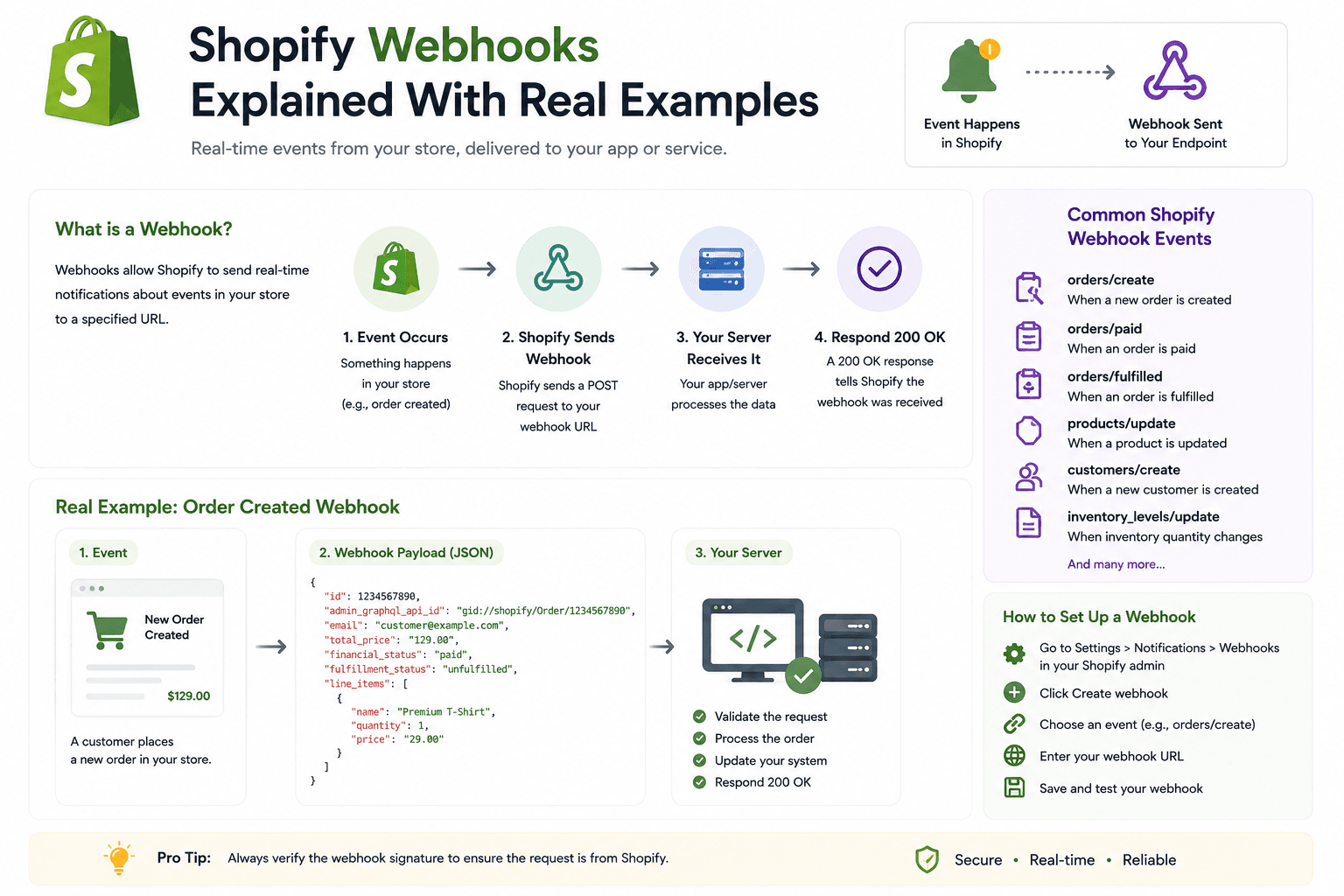
What Is a Shopify Webhook?A Shopify webhook is a mechanism that allows Shopify to notify your application when a specific event happens in a store.
For example:
Customer places order
        ↓
Shopify creates order
        ↓
Shopify sends webhook
        ↓
Your server receives webhook
        ↓
Your application processes event
A webhook subscription defines the topic your application wants to watch and the destination where Shopify should deliver the event. :contentReference[oaicite:2]{index=2}
Why Shopify Store Speed Matters
Why Are Shopify Webhooks Important?Webhooks are especially useful when your application needs to react to changes without continuously polling Shopify.
Common examples include:
- Synchronizing new orders
- Updating inventory
- Syncing products
- Sending notifications
- Updating an external database
- Triggering background jobs
- Cleaning up data after app uninstall
- Connecting Shopify with ERP systems
- Connecting Shopify with warehouse systems
Why Shopify Store Speed Matters
Webhooks vs PollingThe difference becomes easier to understand with an example.
Polling
Your Server
     ↓
Shopify API
     ↓
Anything changed?
     ↓
No

Wait
     ↓
Shopify API
     ↓
Anything changed?
     ↓
No

Wait
     ↓
Shopify API
Webhook
Something changes in Shopify
          ↓
Shopify
          ↓
Webhook
          ↓
Your Server
          ↓
Process Event
Webhooks allow your application to respond to events rather than constantly checking for changes.
Why Shopify Store Speed Matters
How Shopify Webhooks WorkA typical webhook workflow looks like this:
1. Create webhook subscription
              ↓
2. Shopify stores subscription
              ↓
3. Event occurs
              ↓
4. Shopify creates delivery
              ↓
5. Shopify sends HTTP POST
              ↓
6. Your server receives request
              ↓
7. Verify webhook
              ↓
8. Check duplicate delivery
              ↓
9. Return 2xx response
              ↓
10. Process event
Shopify's current webhook system supports destinations including HTTPS URLs, Google Cloud Pub/Sub, and Amazon EventBridge. :contentReference[oaicite:3]{index=3}
Why Shopify Store Speed Matters
What Is a Webhook Topic?A webhook topic identifies the event your application wants to receive.
For example:
products/create

products/update

products/delete

orders/create

orders/updated

app/uninstalled
Shopify maintains a large list of webhook topics covering different commerce resources and events. :contentReference[oaicite:4]{index=4}
Why Shopify Store Speed Matters
Shopify Webhook Topic Examples| Topic | Example Use Case |
|---|---|
| products/create | Sync newly created products |
| products/update | Update product information |
| products/delete | Remove deleted products from an external system |
| orders/create | Create an order record in your database |
| orders/updated | Synchronize order changes |
| app/uninstalled | Clean up app data after uninstall |
Why Shopify Store Speed Matters
Real Example #1: New Order WebhookImagine you have built an inventory management application.
Whenever a customer places an order, your system needs to know about it.
Customer
   ↓
Places Order
   ↓
Shopify
   ↓
orders/create
   ↓
Your Webhook Endpoint
   ↓
Inventory System
Your application can then perform actions such as updating its own order database or starting an inventory workflow.
Why Shopify Store Speed Matters
Real Example #2: Product Update WebhookSuppose your application synchronizes Shopify products with another database.
Shopify Product
       ↓
Title Changed
       ↓
products/update
       ↓
Your Server
       ↓
Update Database
This prevents your external system from having to repeatedly ask Shopify whether every product has changed.
Why Shopify Store Speed Matters
Real Example #3: Inventory SynchronizationAn inventory management system can use webhook events as part of its synchronization architecture.
Shopify Inventory Change
          ↓
Webhook
          ↓
Node.js Server
          ↓
Queue
          ↓
Inventory Worker
          ↓
MongoDB / Redis / ERP
This architecture is particularly useful when processing needs to happen asynchronously.
Why Shopify Store Speed Matters
Real Example #4: Shopify App UninstallYour application may need to clean up merchant-specific data when a store uninstalls your app.
Merchant
   ↓
Uninstalls App
   ↓
app/uninstalled
   ↓
Your Server
   ↓
Mark Installation Inactive
   ↓
Cleanup / Retention Workflow
Apps distributed through the Shopify App Store also need to handle Shopify's mandatory compliance webhook topics. :contentReference[oaicite:5]{index=5}
Why Shopify Store Speed Matters
How to Create Shopify Webhook Subscriptions
Shopify currently supports app-specific subscriptions configured in
shopify.app.toml, as well as shop-specific subscriptions
created through the GraphQL Admin API. Shopify recommends
app-specific subscriptions when the same configuration should apply
to every shop that installs the app. :contentReference[oaicite:6]{index=6}
Why Shopify Store Speed Matters
Option 1: Webhooks in shopify.app.tomlA simplified configuration can look like this:
[webhooks]

api_version = "2026-07"

[[webhooks.subscriptions]]

topics = ["products/create"]

uri = "https://example.com/webhooks/products"
You can define multiple topics and subscriptions in your app configuration.
Shopify's documentation currently recommends configuring the webhook API version explicitly and updating it as part of your app versioning process. :contentReference[oaicite:7]{index=7}
Why Shopify Store Speed Matters
Option 2: Create a Webhook With GraphQL
Shop-specific webhook subscriptions can be created through the
GraphQL Admin API using the
webhookSubscriptionCreate mutation.
:contentReference[oaicite:8]{index=8}
mutation {
  webhookSubscriptionCreate(
    topic: PRODUCTS_CREATE
    webhookSubscription: {
      uri: "https://example.com/webhooks/products"
      format: JSON
    }
  ) {
    webhookSubscription {
      id
      topic
    }

    userErrors {
      field
      message
    }
  }
}
The exact schema and enum names depend on the Shopify API version you're targeting, so always check the current GraphQL Admin API documentation before implementing the mutation.
Why Shopify Store Speed Matters
Building a Shopify Webhook Endpoint With Node.jsLet's create a simple Express endpoint.
import express from "express";

const app = express();

app.post(
    "/webhooks/orders",
    express.raw({ type: "application/json" }),
    async (req, res) => {

        console.log(req.body);

        res.status(200).send("OK");
    }
);
The important detail here is that webhook signature verification requires the original request body. Shopify specifically documents verifying the HMAC against the raw request body for HTTPS deliveries. :contentReference[oaicite:9]{index=9}
Why Shopify Store Speed Matters
Why Raw Request Body MattersA common mistake is to parse the JSON body before verifying the Shopify HMAC.
The safe flow is:
Raw HTTP Body
      ↓
HMAC Verification
      ↓
Valid?
      ↓
Parse JSON
      ↓
Process Webhook
Shopify calculates the HMAC from the raw request body and your app's client secret. :contentReference[oaicite:10]{index=10}
Why Shopify Store Speed Matters
Shopify Webhook HMAC VerificationSecurity is one of the most important parts of webhook development.
For HTTPS deliveries, Shopify includes a Base64-encoded HMAC-SHA256
signature in the
X-Shopify-Hmac-SHA256 header. Your server should
calculate its own signature using the raw request body and your
app's client secret, then compare the values.
:contentReference[oaicite:11]{index=11}
Shopify
   ↓
Payload
   +
HMAC Signature
   ↓
Your Server
   ↓
Calculate HMAC
   ↓
Compare
   ↓
Valid / Invalid
Why Shopify Store Speed Matters
Node.js HMAC Verification Exampleimport crypto from "crypto";
function verifyShopifyWebhook(
rawBody,
hmacHeader,
secret
) {
const digest = crypto
.createHmac("sha256", secret)
.update(rawBody)
.digest("base64");
return crypto.timingSafeEqual(
Buffer.from(digest),
Buffer.from(hmacHeader)
);
}In production, make sure the header exists and that the buffers are handled safely before performing the comparison.
Why Shopify Store Speed Matters
Complete Express Webhook Exampleimport express from "express";
import crypto from "crypto";
const app = express();
app.post(
"/webhooks/orders",
express.raw({ type: "application/json" }),
async (req, res) => {
const hmac = req.headers[
"x-shopify-hmac-sha256"
];
const secret = process.env.SHOPIFY_API_SECRET;
const digest = crypto
.createHmac("sha256", secret)
.update(req.body)
.digest("base64");
const valid =
hmac &&
crypto.timingSafeEqual(
Buffer.from(digest),
Buffer.from(hmac)
);
if (!valid) {
return res.status(401).send("Invalid HMAC");
}
const order = JSON.parse(
req.body.toString("utf8")
);
console.log("New order:", order.id);
res.status(200).send("OK");
}
);
app.listen(3000);Shopify's official guidance recommends validating the HMAC before processing an HTTPS delivery. :contentReference[oaicite:12]{index=12}
Why Shopify Store Speed Matters
Important: Do Not Trust the Webhook Payload BlindlyReceiving a POST request does not automatically prove that the request came from Shopify.
Your application should validate the delivery before performing sensitive operations.
Request Received
      ↓
Verify HMAC
      ↓
Check Delivery ID
      ↓
Validate Topic
      ↓
Process Event
Why Shopify Store Speed Matters
Shopify Webhook HeadersShopify webhook deliveries include useful headers.
Important examples include:
X-Shopify-TopicX-Shopify-Hmac-SHA256X-Shopify-Shop-DomainX-Shopify-API-VersionX-Shopify-Webhook-IdX-Shopify-Triggered-AtX-Shopify-Event-Id
Shopify documents these headers as part of the webhook delivery structure. :contentReference[oaicite:13]{index=13}
Why Shopify Store Speed Matters
What Is X-Shopify-Webhook-Id?
The X-Shopify-Webhook-Id header provides a unique
identifier for a delivery.
It is useful for detecting duplicate deliveries.
Webhook Received
      ↓
Webhook ID
      ↓
Already Processed?
   /          \
 YES          NO
 ↓             ↓
Skip        Process
Shopify explicitly recommends using the webhook ID to identify and deduplicate deliveries. :contentReference[oaicite:14]{index=14}
Why Shopify Store Speed Matters
Why Shopify Webhooks Can Be Delivered More Than OnceYour webhook handler must be designed to tolerate duplicate deliveries.
For example:
Shopify
   ↓
Webhook Delivery
   ↓
Your Server

Processing takes too long
   ↓
Delivery fails

Shopify retries
   ↓
Same event arrives again
Shopify currently retries failed webhook deliveries up to 8 times over 4 hours using exponential backoff. :contentReference[oaicite:15]{index=15}
Why Shopify Store Speed Matters
Webhook IdempotencyYour webhook processing should be idempotent where possible.
That means processing the same event again should not accidentally create duplicate business operations.
For example, don't blindly create:
Order #1001
Order #1001
Order #1001
if the same webhook delivery is retried.
Instead, store the delivery ID or another appropriate event key and check whether it has already been processed.
Why Shopify Store Speed Matters
Example: Deduplicating Webhooks With MongoDBSuppose your application uses MongoDB.
WebhookEvent

{
    webhookId: "...",
    topic: "orders/create",
    shop: "example.myshopify.com",
    processedAt: Date
}
Before processing:
Find webhookId

        ↓

Exists?
 /    \
YES    NO
 ↓      ↓
Skip   Process
        ↓
   Save webhookId
A unique database index on the webhook ID can also help prevent duplicate records under concurrent processing.
Why Shopify Store Speed Matters
Respond to Shopify QuicklyA webhook endpoint should acknowledge the delivery quickly.
Don't make Shopify wait while your application performs a long database operation, API synchronization, report generation, or expensive background task.
Webhook
   ↓
Verify
   ↓
Queue Job
   ↓
Return 200
   ↓
Worker Processes Job
Shopify's current webhook guidance recommends acknowledging deliveries quickly and moving long-running work out of the request path. :contentReference[oaicite:16]{index=16}
Why Shopify Store Speed Matters
Using BullMQ for Shopify WebhooksIf your application already uses Redis and BullMQ, webhooks are a natural place to introduce background processing.
Shopify
   ↓
Webhook
   ↓
Express
   ↓
Verify HMAC
   ↓
Check Duplicate
   ↓
BullMQ
   ↓
Redis
   ↓
Worker
   ↓
MongoDB / External API
This architecture prevents heavy processing from blocking the webhook request.
Why Shopify Store Speed Matters
Example BullMQ Webhook Flowapp.post("/webhooks/orders", async (req, res) => {
// 1. Verify HMAC
// 2. Check webhook ID
// 3. Add job
await orderQueue.add(
"process-order",
{
webhookId,
payload
}
);
// 4. Acknowledge quickly
res.status(200).send("OK");
});The worker can then process the order independently.
Why Shopify Store Speed Matters
Shopify Webhook Architecture With Redis SHOPIFY
│
↓
Webhook POST
│
↓
Node.js API
│
┌──────────┴──────────┐
↓ ↓
HMAC Verify Duplicate Check
│ │
└──────────┬──────────┘
↓
BullMQ
↓
Redis
↓
Worker
↓
MongoDB
↓
External ServicesWhy Shopify Store Speed Matters
Real Example: Order SynchronizationLet's say your application synchronizes Shopify orders with an ERP.
Shopify Order Created
        ↓
orders/create
        ↓
Webhook Endpoint
        ↓
Verify HMAC
        ↓
Check Webhook ID
        ↓
Queue ERP Sync
        ↓
Return 200
        ↓
Worker
        ↓
ERP API
If the ERP API is temporarily unavailable, the worker can retry the job without forcing Shopify's webhook request to remain open.
Why Shopify Store Speed Matters
Real Example: Product SynchronizationImagine a marketplace application that needs to keep product information synchronized.
Product Updated
      ↓
products/update
      ↓
Webhook
      ↓
Queue
      ↓
Product Worker
      ↓
Transform Data
      ↓
External Database
Why Shopify Store Speed Matters
Real Example: Inventory SynchronizationAn inventory application may receive Shopify events and update its internal stock records.
Shopify
Inventory Change
      ↓
Webhook
      ↓
Node.js
      ↓
BullMQ
      ↓
Inventory Worker
      ↓
MongoDB
      ↓
Socket.IO
      ↓
Dashboard Updates
This is a good example of how webhooks can become the entry point for an event-driven ecommerce architecture.
Why Shopify Store Speed Matters
Shopify Webhooks and GraphQLModern Shopify development increasingly uses GraphQL for API operations, and Shopify supports creating shop-specific webhook subscriptions through the GraphQL Admin API. :contentReference[oaicite:17]{index=17}
This is especially relevant when building new Shopify applications.
You can use GraphQL to create and manage webhook subscriptions while your application receives the actual webhook delivery through HTTPS, Pub/Sub, or EventBridge.
Why Shopify Store Speed Matters
Webhook Subscription vs Webhook DeliveryThese two concepts are easy to confuse.
Subscription
A subscription tells Shopify:
"I want to know when products are updated."Delivery
A delivery is the actual event Shopify sends after a qualifying product update occurs.
Subscription
      ↓
Product Updated
      ↓
Delivery
Why Shopify Store Speed Matters
Shopify Webhook Delivery MethodsShopify supports multiple webhook delivery destinations.
- HTTPS
- Google Cloud Pub/Sub
- Amazon EventBridge
Shopify recommends Google Cloud Pub/Sub as a cloud-based solution for webhook delivery, while HTTPS is also available when you manage your own webhook infrastructure. :contentReference[oaicite:18]{index=18}
Why Shopify Store Speed Matters
HTTPS WebhooksHTTPS is often the easiest option for developers building a Node.js or Express application.
Shopify
   ↓
HTTPS POST
   ↓
https://yourdomain.com/webhooks/orders
   ↓
Express
HTTPS deliveries require HMAC verification. :contentReference[oaicite:19]{index=19}
Why Shopify Store Speed Matters
Google Cloud Pub/SubPub/Sub can be useful when building cloud-based event processing infrastructure.
Shopify
   ↓
Google Pub/Sub
   ↓
Consumer
   ↓
Worker
   ↓
Database
Shopify documents Pub/Sub as one of its supported webhook delivery methods. :contentReference[oaicite:20]{index=20}
Why Shopify Store Speed Matters
Amazon EventBridgeAWS-based applications can use Amazon EventBridge as another webhook destination.
Shopify
   ↓
EventBridge
   ↓
AWS
   ↓
Lambda / Consumer
   ↓
Application
EventBridge is supported as a webhook delivery destination in Shopify's current webhook system. :contentReference[oaicite:21]{index=21}
Why Shopify Store Speed Matters
Shopify Webhook API VersioningWebhook payloads are associated with an API version.
Shopify recommends updating webhook API versions regularly, and the
api_version configuration controls the version used to
serialize payloads for app-specific subscriptions.
:contentReference[oaicite:22]{index=22}
This matters because your application should not assume that webhook payloads will remain identical forever.
Why Shopify Store Speed Matters
Why You Should Test Webhook PayloadsWhen changing API versions, test your webhook handler against the new payload format before deploying it.
Current Version
      ↓
Existing Handler

New API Version
      ↓
Test Payload
      ↓
Handler
      ↓
Verify Compatibility
      ↓
Deploy
Shopify provides CLI tooling to trigger webhook payloads for testing against an API version. :contentReference[oaicite:23]{index=23}
Why Shopify Store Speed Matters
Testing Shopify Webhooks LocallyDuring development, your local server isn't normally accessible from Shopify's infrastructure.
You can use Shopify's development tooling and a publicly reachable development endpoint when testing real deliveries.
Shopify CLI also provides an
app webhook trigger command for triggering webhook
topics during development. :contentReference[oaicite:24]{index=24}
Why Shopify Store Speed Matters
Example Local Development WorkflowLocal Node.js Server
↓
Development Tunnel / Public Endpoint
↓
Shopify
↓
Webhook
↓
Your Local HandlerWhy Shopify Store Speed Matters
How to Test an Order WebhookA practical testing workflow could be:
- Create your webhook endpoint.
- Configure the order topic.
- Start your development server.
- Make the endpoint reachable for Shopify.
- Trigger a test event.
- Inspect the headers.
- Verify the HMAC.
- Check the payload.
- Test duplicate handling.
- Test failure and retry behavior.
Why Shopify Store Speed Matters
Common Shopify Webhook Mistakes- Not verifying HMAC
- Parsing the body before HMAC verification
- Processing the same webhook multiple times
- Taking too long to return a response
- Doing heavy work directly inside the request handler
- Not handling retries
- Not storing delivery IDs
- Ignoring API version changes
- Using the wrong webhook topic
- Requesting unnecessary access scopes
- Not monitoring failed deliveries
Why Shopify Store Speed Matters
Webhook Security Checklist- Verify the HMAC signature for HTTPS deliveries.
- Keep your Shopify client secret secure.
- Never expose secrets in frontend JavaScript.
- Use HTTPS in production.
- Deduplicate webhook deliveries.
- Validate the webhook topic and shop context.
- Store only the data your application actually needs.
- Log useful delivery metadata without exposing sensitive secrets.
Why Shopify Store Speed Matters
Webhook Reliability Checklist- Return a 2xx response quickly.
- Move expensive work to a queue.
- Make processing idempotent.
- Track webhook IDs.
- Handle retries.
- Monitor failed deliveries.
- Use appropriate database indexes.
- Have a recovery strategy for failed jobs.
Why Shopify Store Speed Matters
What Happens If Your Webhook Endpoint Fails?Shopify retries failed webhook deliveries.
The current retry mechanism uses exponential backoff and can retry a failed delivery up to 8 times over 4 hours. :contentReference[oaicite:25]{index=25}
This is why webhook endpoints should be reliable and why your application should be prepared to receive the same event more than once.
Why Shopify Store Speed Matters
How to Handle Webhook FailuresWebhook
↓
Receive
↓
Verify
↓
Queue
↓
Return 200
Worker
↓
Process
↓
Success?
YES → Complete
NO
↓
Retry Job
↓
Dead Letter / Failed QueueThis separation makes the system much more resilient than performing every operation directly inside the HTTP request.
Why Shopify Store Speed Matters
Webhook MonitoringProduction applications should monitor webhook health.
Useful metrics include:
- Total deliveries
- Successful deliveries
- Failed deliveries
- Processing duration
- Duplicate events
- Queue failures
- Retry counts
Shopify notes that a delivery failure rate above 0.5% is higher than average and can indicate an issue that needs investigation. :contentReference[oaicite:26]{index=26}
Why Shopify Store Speed Matters
Shopify Webhooks With MicroservicesLarger ecommerce applications can route webhook events into separate services.
Shopify
   ↓
Webhook Gateway
   ↓
Event Queue
   ↓
 ┌───────────────┬───────────────┐
 ↓               ↓               ↓
Order Service   Inventory       Product
                Service         Service
 ↓               ↓               ↓
Database        Database        Database
This architecture can be useful when different parts of the system have different scaling and processing requirements.
Why Shopify Store Speed Matters
Shopify Webhooks vs Shopify EventsShopify is also introducing a newer subscription mechanism called Events.
Events provide more control over field-level triggers, filtering, and custom GraphQL payloads.
However, Shopify currently describes Events as being in developer preview, with a subset of topics available. Shopify recommends continuing to use webhooks for production while Events coverage expands. :contentReference[oaicite:27]{index=27}
For now, the practical approach is:
Supported production webhook topics
        ↓
Use Webhooks

Events developer preview
        ↓
Experiment / Evaluate

More Events coverage
        ↓
Migrate selectively
Why Shopify Store Speed Matters
When Should You Use Shopify Webhooks?Webhooks are a strong choice when your application needs to react to Shopify events.
Examples include:
- Order synchronization
- Product synchronization
- Inventory workflows
- Customer-related workflows
- App installation and uninstall handling
- ERP integration
- Warehouse integration
- Notification systems
- Background processing
Why Shopify Store Speed Matters
When Should You Use Shopify API Instead?Webhooks tell you that something happened, but they aren't a replacement for Shopify APIs.
You may receive a webhook and then use the Admin GraphQL API to retrieve additional information or perform a follow-up operation.
Shopify Event
      ↓
Webhook
      ↓
Your Server
      ↓
Admin GraphQL API
      ↓
Additional Data / Action
This combination is common in Shopify applications.
Why Shopify Store Speed Matters
Webhook + Admin GraphQL API ExampleSuppose your application receives a product update webhook.
products/update
      ↓
Webhook Handler
      ↓
Extract Product ID
      ↓
GraphQL Admin API
      ↓
Fetch Required Data
      ↓
Update External System
The webhook acts as the event trigger, while GraphQL performs the additional data operation.
Why Shopify Store Speed Matters
Frequently Asked QuestionsWhat is a Shopify webhook?
A Shopify webhook allows an application to receive a notification when a subscribed Shopify event occurs. Shopify sends the delivery to a configured destination such as an HTTPS endpoint, Google Cloud Pub/Sub, or Amazon EventBridge. :contentReference[oaicite:28]{index=28}
What are Shopify webhook topics?
Webhook topics identify the events an application wants to receive, such as product creation, product updates, order creation, or app uninstall events. :contentReference[oaicite:29]{index=29}
How do I verify a Shopify webhook?
For HTTPS deliveries, calculate an HMAC-SHA256 signature using the raw request body and your app's client secret, then compare it with the X-Shopify-Hmac-SHA256 header using a constant-time comparison. :contentReference[oaicite:30]{index=30}
Can Shopify send the same webhook more than once?
Yes. Your application should be prepared for duplicate deliveries and use the X-Shopify-Webhook-Id to identify and deduplicate deliveries. Shopify retries failed deliveries. :contentReference[oaicite:31]{index=31}
How many times does Shopify retry a failed webhook?
Shopify's current retry mechanism retries failed webhook deliveries up to 8 times over 4 hours using exponential backoff. :contentReference[oaicite:32]{index=32}
Should webhook processing happen inside the HTTP request?
Heavy processing should generally be moved to a background queue or worker. The webhook endpoint should validate the request and acknowledge it quickly, while longer operations can happen asynchronously. :contentReference[oaicite:33]{index=33}
Can I create Shopify webhooks with GraphQL?
Yes. Shopify supports shop-specific webhook subscriptions through the GraphQL Admin API using the webhookSubscriptionCreate mutation. :contentReference[oaicite:34]{index=34}
Can I configure Shopify webhooks in shopify.app.toml?
Yes. Shopify supports app-specific webhook subscriptions through shopify.app.toml, which can apply the configured subscriptions across shops that install your app. :contentReference[oaicite:35]{index=35}
Do Shopify webhooks use GraphQL?
Webhook subscriptions can be managed through the GraphQL Admin API, but webhook deliveries themselves can be sent to HTTPS, Google Cloud Pub/Sub, or Amazon EventBridge. :contentReference[oaicite:36]{index=36}
Are Shopify webhooks better than polling?
For event-driven use cases, webhooks can be more efficient because Shopify sends a delivery when a subscribed event occurs instead of your application repeatedly asking whether something changed. :contentReference[oaicite:37]{index=37}
Why Shopify Store Speed Matters
Shopify Webhook Production Checklist- Choose the correct webhook topic.
- Request the required access scope.
- Configure the subscription.
- Use a secure HTTPS endpoint when appropriate.
- Preserve the raw request body for HMAC verification.
- Verify the Shopify HMAC.
- Check the webhook ID.
- Prevent duplicate processing.
- Return a 2xx response quickly.
- Move expensive work to a queue.
- Handle retries.
- Monitor failures.
- Test API-version changes.
- Keep Shopify secrets secure.
- Log useful webhook metadata.
Why Shopify Store Speed Matters
Final ThoughtsShopify webhooks are one of the most important concepts to understand when building serious Shopify applications.
Instead of repeatedly asking Shopify whether something has changed, your application can subscribe to relevant events and react when Shopify sends a delivery.
A production-ready webhook implementation should do more than simply receive JSON.
Receive
   ↓
Verify HMAC
   ↓
Deduplicate
   ↓
Validate
   ↓
Queue
   ↓
Acknowledge
   ↓
Process
   ↓
Monitor
Once you combine webhooks with the Shopify Admin GraphQL API, Redis, BullMQ, MongoDB, and background workers, you can build reliable event-driven Shopify applications that synchronize orders, products, inventory, customers, and external business systems.
The most important principle is simple: treat webhooks as events that can be retried, duplicated, and delayed, rather than assuming that every delivery happens exactly once.
Build your webhook handlers with security, idempotency, fast acknowledgement, asynchronous processing, and monitoring from the beginning, and your Shopify integration will be much easier to scale and maintain.