Understanding Shopify theme architecture is one of the most important steps when moving from basic Shopify customization to professional theme development.
If you have ever opened a Shopify theme code editor and wondered
what the layout, templates,
sections, snippets, and
assets folders are actually responsible for, you're
not alone.
A Shopify theme is not just a collection of Liquid files. It is a structured system where different files work together to generate the pages visitors see.
In this guide, we'll break down the main parts of a Shopify theme, explain what each directory does, show how the files communicate with each other, and discuss how to decide where your custom code belongs.
Why Shopify Store Speed Matters
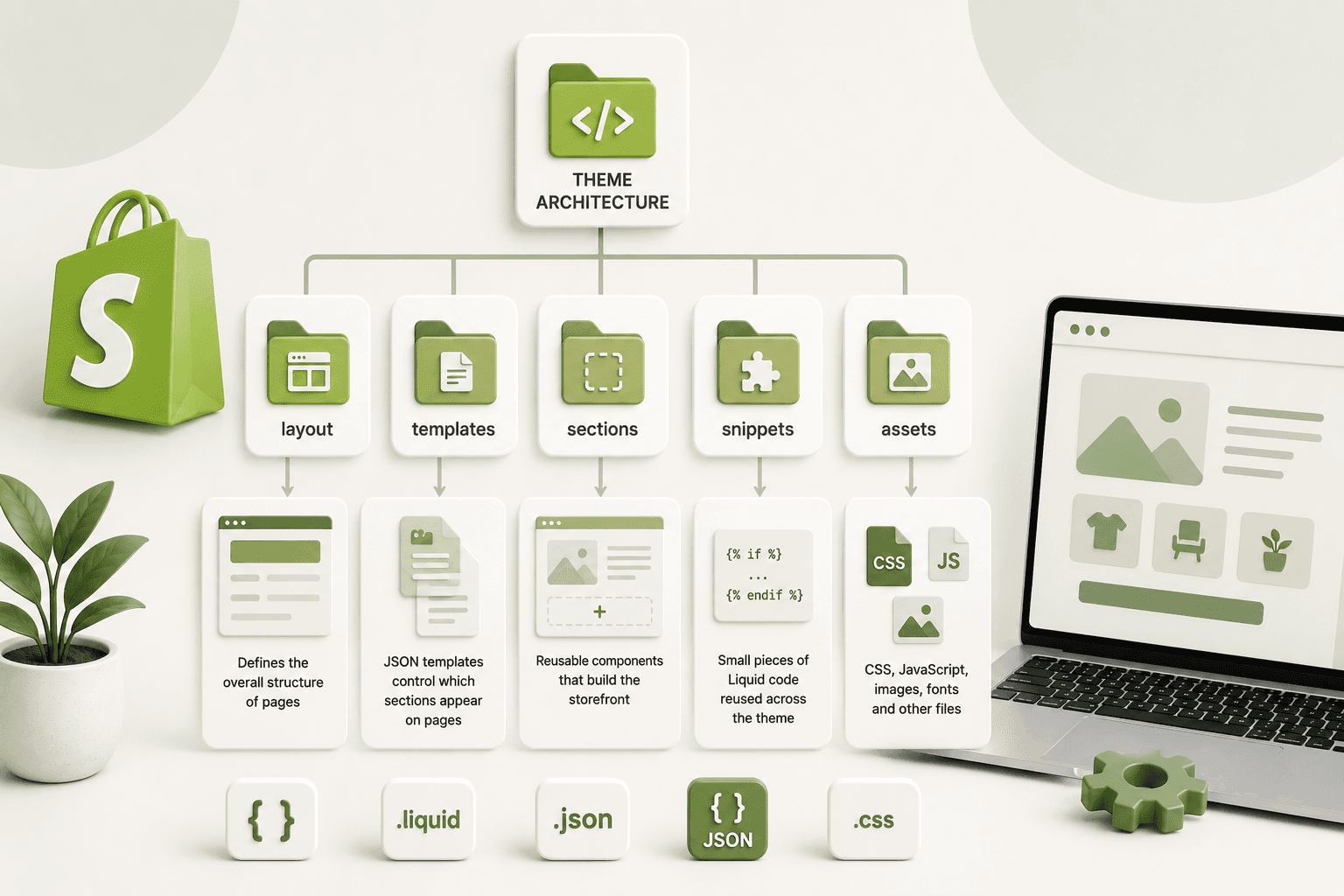
What Is Shopify Theme Architecture?Shopify theme architecture describes how the files and components inside a Shopify theme are organized and how they work together to render a storefront.
A modern Shopify theme can contain layouts, JSON templates, Liquid sections, snippets, assets, configuration files, and translation files.
Each part has a specific responsibility. The goal of this architecture is to separate page structure, reusable components, configuration, styling, JavaScript, and content.
A simplified Shopify theme structure looks like this:
theme/
│
├── assets/
├── config/
├── layout/
├── locales/
├── sections/
├── snippets/
├── templates/
│
└── other theme files
The exact files can vary between themes, but these directories form the foundation you will encounter when working with Shopify themes.
Why Shopify Store Speed Matters
Shopify Theme Architecture at a Glance| Directory | Primary Purpose | Typical Files |
|---|---|---|
layout/ |
Global page structure | theme.liquid |
templates/ |
Page-level composition | product.json, collection.json |
sections/ |
Reusable page components | hero-banner.liquid |
snippets/ |
Reusable Liquid markup | product-card.liquid |
assets/ |
CSS, JavaScript and static assets | theme.css, custom.js |
config/ |
Theme configuration | settings_schema.json |
locales/ |
Translations | en.default.json |
Why Shopify Store Speed Matters
1. The Layout Directory
The layout directory contains the overall structure
that wraps pages in your Shopify theme.
The most important file you will commonly see here is:
layout/theme.liquid
Think of theme.liquid as the main shell of your
storefront.
It commonly contains the document structure:
<!doctype html>
<html>
    <head>
        ...
    </head>

    <body>

        ...

        {{ content_for_layout }}

        ...

    </body>
</html>
The important Liquid object here is:
{{ content_for_layout }}This is where Shopify inserts the content generated by the appropriate template for the current page.
In simple terms, the relationship can be thought of as:
theme.liquid
      ↓
page-specific template
      ↓
sections
      ↓
snippets
Why Shopify Store Speed Matters
What Should Go Inside theme.liquid?
Because theme.liquid is part of the global page
structure, you should be careful about putting page-specific
functionality directly inside it.
Common global elements include:
- HTML document structure
- Global metadata
- Global stylesheet references
- Global JavaScript references
- Header
- Footer
- Global app integrations
- Content layout
Avoid turning theme.liquid into one huge file
containing every component of your storefront.
Why Shopify Store Speed Matters
2. The Templates DirectoryTemplates define the structure and content composition for different types of Shopify pages.
Depending on the theme architecture, you may encounter JSON templates such as:
templates/
    index.json
    product.json
    collection.json
    page.json
    blog.json
    article.json
    cart.json
A product template, for example, determines which sections should be used to build the product page.
A simplified JSON template might look like:
{
  "sections": {
    "main": {
      "type": "main-product"
    }
  },
  "order": [
    "main"
  ]
}
The template isn't necessarily responsible for containing all of the product page's HTML. Instead, it can define which sections should be rendered and their configuration.
Why Shopify Store Speed Matters
Why JSON Templates MatterJSON templates are particularly important in Shopify Online Store 2.0 themes because they allow merchants to control page composition through sections.
Instead of having a single large Liquid template containing the entire page, the page can be assembled from reusable sections.
For example:
Product Page
│
├── Main Product
├── Product Recommendations
├── Image With Text
└── Reviews
Each component can be represented by a section and configured through the theme editor.
Why Shopify Store Speed Matters
3. The Sections Directory
The sections directory contains reusable storefront
components.
Examples include:
sections/
    header.liquid
    footer.liquid
    hero-banner.liquid
    featured-collection.liquid
    image-with-text.liquid
    testimonials.liquid
    main-product.liquid
A section can contain:
- HTML
- Liquid
- CSS
- JavaScript
- Section settings
- Block definitions
- Presets
Why Shopify Store Speed Matters
Section SchemaOne of the most useful features of a Shopify section is its schema.
Schema defines how the section appears in the Shopify theme editor and what settings the merchant can control.
For example:
{% raw %}{% schema %}
{
  "name": "Hero Banner",

  "settings": [
    {
      "type": "text",
      "id": "heading",
      "label": "Heading"
    },

    {
      "type": "image_picker",
      "id": "image",
      "label": "Image"
    }
  ],

  "presets": [
    {
      "name": "Hero Banner"
    }
  ]
}
{% endschema %}{% endraw %}
The Liquid markup can then access those settings:
{% raw %}
    {{ section.settings.heading }}


{% if section.settings.image != blank %}
    {{ section.settings.image | image_url: width: 1600 | image_tag }}
{% endif %}{% endraw %}
This creates a connection between the theme editor and your Liquid code.
Why Shopify Store Speed Matters
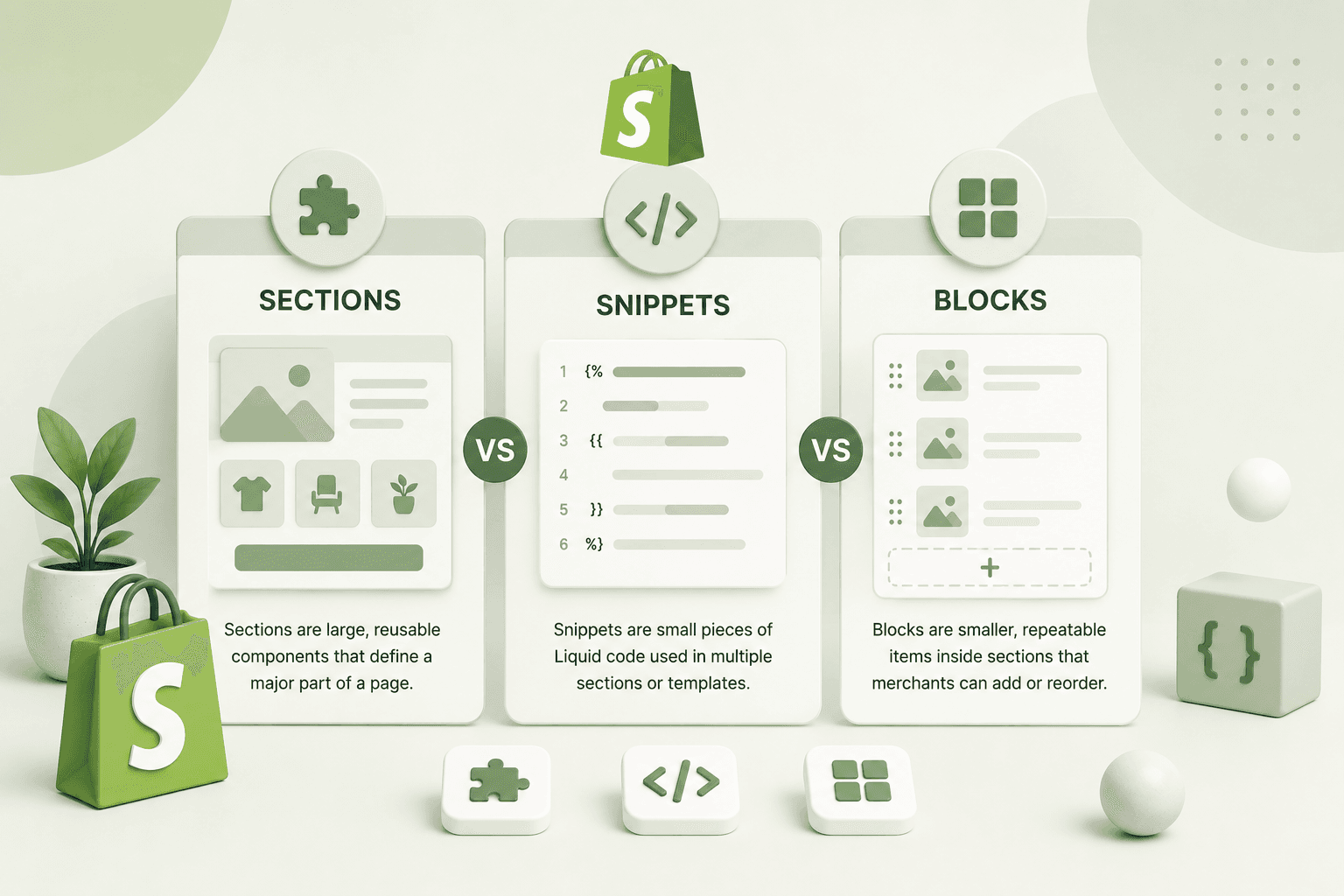
4. Shopify BlocksBlocks are components that live inside sections and are useful when a merchant needs to manage multiple similar items.
For example, a testimonial section might contain multiple testimonial blocks:
Testimonials Section
│
├── Testimonial Block
├── Testimonial Block
├── Testimonial Block
└── Testimonial Block
A block can define its own settings.
{% raw %}"blocks": [
    {
        "type": "testimonial",
        "name": "Testimonial",

        "settings": [
            {
                "type": "text",
                "id": "name",
                "label": "Customer name"
            },
            {
                "type": "textarea",
                "id": "quote",
                "label": "Quote"
            }
        ]
    }
]{% endraw %}
The section can then loop through its blocks:
{% raw %}{% for block in section.blocks %}

    <article class="testimonial"
        {{ block.shopify_attributes }}>

        <h3>
            {{ block.settings.name }}
        </h3>

        <p>
            {{ block.settings.quote }}
        </p>

    </article>

{% endfor %}{% endraw %}
This makes the section flexible because the merchant can manage the individual testimonials without changing the Liquid code.
Why Shopify Store Speed Matters
5. The Snippets Directory
The snippets directory contains smaller reusable
Liquid components.
A theme might contain:
snippets/
    product-card.liquid
    price.liquid
    icon-arrow.liquid
    button.liquid
    pagination.liquid
    product-badge.liquid
Snippets are useful when the same markup or Liquid logic is required in multiple locations.
Why Shopify Store Speed Matters
Rendering a Snippet
You can render a snippet using the Liquid render tag.
{% raw %}{% render 'product-card',
    product: product
%}{% endraw %}
You can pass values into the snippet, allowing the same component to behave differently depending on the data provided.
For example:
{% raw %}{% render 'product-card',
    product: product,
    show_vendor: true
%}{% endraw %}
This is much cleaner than copying the entire product-card markup into every section that needs it.
Why Shopify Store Speed Matters
6. The Assets Directory
The assets directory contains frontend assets used by
the theme.
Common files include:
assets/
    theme.css
    custom.css
    theme.js
    custom.js
    slider.js
Depending on the theme, you may also find other asset types such as fonts or static files.
Why Shopify Store Speed Matters
CSS in Shopify ThemesCSS controls the visual presentation of your storefront.
When adding custom styles, avoid using overly generic selectors that could affect unrelated components.
For example, instead of:
.title {
    font-size: 32px;
}
use a component-specific class:
.bbs-custom-banner__title {
    font-size: 32px;
}
This is particularly important when working on an existing Shopify theme containing many components and third-party integrations.
Why Shopify Store Speed Matters
JavaScript in Shopify ThemesJavaScript can be used to add interactive behavior such as:
- Sliders
- Variant selectors
- Cart drawer interactions
- Modal windows
- Tabs
- Accordions
- Ajax cart functionality
- Dynamic filtering
When adding custom JavaScript, make sure it doesn't interfere with existing theme functionality.
If a feature only exists on one page, consider whether its JavaScript needs to be loaded globally.
Why Shopify Store Speed Matters
7. The Config Directory
The config directory contains theme configuration
information.
One important file you may encounter is:
config/settings_schema.jsonThis file defines settings that can appear in the Shopify theme settings area.
For example, a theme might expose settings for:
- Colors
- Typography
- Social links
- Logo
- Layout options
- Global design settings
Theme configuration should be designed carefully because global settings can affect many components across the storefront.
Why Shopify Store Speed Matters
8. The Locales Directory
The locales directory contains translation strings
used by the theme.
For example:
locales/
    en.default.json
    fr.json
    de.json
Instead of hard-coding every piece of interface text directly into the theme, a translation system can allow the same theme to support multiple languages.
This becomes particularly important for stores serving customers in multiple countries or regions.
Why Shopify Store Speed Matters
9. How Everything Connects TogetherThe most important thing to understand isn't just what each folder does. It's how the folders work together.
Consider a Shopify product page.
Browser Request
      ↓
Shopify
      ↓
Layout
      ↓
Product Template
      ↓
Product Sections
      ↓
Blocks
      ↓
Snippets
      ↓
HTML
      ↓
Browser
This isn't a strict representation of every internal rendering detail, but it is a useful mental model for understanding how a theme is organized.
Why Shopify Store Speed Matters
10. A Real Product Page ExampleImagine a product page containing:
Product Page
│
├── Header
│
├── Main Product Section
│   ├── Product Media
│   ├── Product Information
│   ├── Price
│   ├── Variant Picker
│   └── Add to Cart
│
├── Product Recommendations
│
├── Reviews
│
└── Footer
The main product component could be a section:
sections/main-product.liquidInside that section, reusable components might be rendered from snippets:
snippets/price.liquid
snippets/product-badge.liquid
snippets/icon-cart.liquid
Repeated configurable content, such as additional information blocks, can be handled using section blocks.
CSS and JavaScript required for the components can be maintained in the assets directory.
Why Shopify Store Speed Matters
11. Where Should You Put Custom Shopify Code?One of the most common questions when customizing a Shopify theme is:
"Which file should I edit?"
The answer depends on what you're building.
| Requirement | Recommended Location |
|---|---|
| Global HTML structure | layout/theme.liquid |
| Page composition | templates/ |
| Large configurable component | sections/ |
| Repeated small markup | snippets/ |
| Repeated configurable items | Blocks inside sections |
| Custom CSS | assets/ |
| Custom JavaScript | assets/ |
| Theme settings | config/ |
| Translations | locales/ |
Why Shopify Store Speed Matters
12. Don't Put Everything in theme.liquid
One mistake I see frequently when developers start customizing
Shopify themes is putting every customization inside
theme.liquid.
It might feel convenient because the file is easy to find, but this approach can make the theme difficult to maintain.
If you're adding a custom announcement banner, create a section.
If you're creating a reusable product badge, create a snippet.
If you're adding a collection of configurable items, consider blocks.
If you're adding styles, keep them organized in CSS.
If you're adding interactive behavior, keep the JavaScript separated.
Why Shopify Store Speed Matters
13. Avoid Duplicating Liquid CodeAnother common problem is copying the same Liquid markup into multiple files.
For example, if a product card appears on:
- Homepage
- Collection page
- Search results
- Related products
- Recommended products
copying the entire card markup into every location creates unnecessary duplication.
A reusable snippet can help:
{% raw %}{% render 'product-card',
    product: product
%}{% endraw %}
Now the component has one primary implementation.
Why Shopify Store Speed Matters
14. Use Sections for Merchant-Controlled ComponentsIf a store owner needs to change the content or layout from the Shopify theme editor, consider whether the component should be a section.
For example:
- Hero heading
- Hero image
- Promotional message
- Featured collection
- Testimonials
- Image-with-text
Instead of asking a merchant to edit Liquid every time they want to change a heading, expose that value as a theme setting.
Why Shopify Store Speed Matters
15. Use Blocks for Repeated ContentBlocks are especially useful when a component contains multiple similar pieces of content.
For example:
FAQ Section
│
├── FAQ Block
├── FAQ Block
├── FAQ Block
└── FAQ Block
The merchant can add or remove questions from the theme editor instead of requiring a developer to modify the Liquid code.
Why Shopify Store Speed Matters
16. Keep Custom Code Clearly IdentifiableWhen working on an existing Shopify store, especially one that has been modified by several developers, it can become difficult to tell which code is custom and which code came from the original theme.
A consistent naming convention can help.
For example:
sections/bbs-custom-banner.liquid

snippets/bbs-product-badge.liquid

assets/bbs-custom.css

assets/bbs-custom.js
The exact naming convention is up to your project, but consistency is more important than the specific prefix you choose.
Why Shopify Store Speed Matters
17. Shopify Theme Architecture and PerformanceTheme architecture can also affect maintainability and performance.
Good organization doesn't automatically make a theme fast, but separating functionality can make it easier to identify unnecessary code and resources.
For example, if a slider is only required on one section, avoid loading a large slider library globally unless there is a good reason to do so.
Similarly, don't add large JavaScript libraries simply to implement a small interaction that could be handled with lightweight code.
Performance should be considered whenever you add new theme functionality.
Why Shopify Store Speed Matters
18. Shopify Theme Architecture and Mobile ResponsivenessEvery custom section should be designed with mobile screens in mind.
A section that looks good on a desktop screen can still create problems on smaller devices.
When developing a custom section, test:
- Typography
- Spacing
- Images
- Buttons
- Columns
- Sliders
- Tables
- Navigation
Don't wait until the end of the project to check mobile responsiveness. Build responsive behavior into the component from the beginning.
Why Shopify Store Speed Matters
19. A Recommended Shopify Development StructureFor a custom Shopify theme, a structure like this can provide a useful starting point:
theme/
│
├── assets/
│   ├── theme.css
│   ├── custom.css
│   └── custom.js
│
├── config/
│   ├── settings_data.json
│   └── settings_schema.json
│
├── layout/
│   └── theme.liquid
│
├── locales/
│   └── en.default.json
│
├── sections/
│   ├── header.liquid
│   ├── footer.liquid
│   ├── hero-banner.liquid
│   ├── main-product.liquid
│   └── featured-collection.liquid
│
├── snippets/
│   ├── product-card.liquid
│   ├── price.liquid
│   └── icon-cart.liquid
│
└── templates/
    ├── index.json
    ├── product.json
    ├── collection.json
    ├── page.json
    └── article.json
This isn't a requirement that every theme must follow exactly. Shopify themes can vary considerably depending on their features and architecture.
The important idea is to keep each part of the theme responsible for a clear purpose.
Why Shopify Store Speed Matters
20. A Simple Way to Remember the ArchitectureIf you're preparing for a Shopify developer interview, this is a useful way to remember the main directories:
LAYOUT
↓
Global shell

TEMPLATES
↓
Page composition

SECTIONS
↓
Large configurable components

BLOCKS
↓
Repeated configurable items

SNIPPETS
↓
Reusable Liquid components

ASSETS
↓
CSS + JavaScript + frontend resources

CONFIG
↓
Theme settings

LOCALES
↓
Translations
Once you understand this hierarchy, navigating an unfamiliar Shopify theme becomes much easier.
Why Shopify Store Speed Matters
Frequently Asked QuestionsWhat is the main file in a Shopify theme?
layout/theme.liquid is commonly used as the main global
layout of a Shopify theme. It provides the document structure and
includes {{ content_for_layout }}, where Shopify
renders the current page content.
What is the difference between Shopify templates and sections?
Templates are used to define the composition of a particular page type, while sections are reusable components that can make up that page. In Online Store 2.0 themes, JSON templates can define which sections appear on a page and how they are configured.
What are Shopify snippets used for?
Snippets are used for reusable pieces of Liquid markup or logic. They are useful when the same component needs to be rendered in multiple locations, such as product cards, prices, icons, or badges.
Can sections contain snippets?
Yes. Sections can render snippets using the Liquid
render tag. This is a common way to keep reusable
markup separate from the larger section structure.
Can sections contain blocks?
Yes. A section can define supported block types in its schema and
render those blocks through section.blocks.
What is the assets folder in Shopify?
The assets directory is used for frontend resources such as CSS, JavaScript, and other theme assets. Keeping custom frontend code organized in assets can make a theme easier to maintain.
What is theme.liquid used for?
The theme.liquid layout commonly provides the global
HTML document structure and shared elements of a Shopify storefront.
It also provides the location where Shopify renders the current
template content.
What should a Shopify developer learn first?
If you're new to Shopify theme development, start with Liquid, templates, sections, snippets, blocks, JSON templates, theme settings, and the Shopify theme editor. Once these concepts are clear, working with more advanced Shopify APIs and app development becomes easier to understand.
Why Shopify Store Speed Matters
Final ThoughtsShopify theme architecture is essentially about giving every part of your storefront a clear responsibility.
The layout provides the global shell. Templates define page composition. Sections create larger configurable components. Blocks handle repeated configurable content. Snippets keep reusable Liquid markup organized, while assets contain the frontend resources needed by the theme.
Once these relationships become familiar, customizing an existing Shopify theme becomes much less intimidating. Instead of asking "Where can I put this code?", you can ask a better question: "What responsibility does this code have?"
That small change in thinking can make a big difference when building professional Shopify themes.
Whether you're creating a custom theme from scratch, modifying a Shopify theme, or preparing for a Shopify developer interview, understanding the architecture will help you write cleaner, reusable, and easier-to-maintain code.