If you're starting with Shopify theme development, three terms you'll see repeatedly are sections, snippets, and blocks.
At first, they can look very similar because all three are used to organize and reuse Liquid code. However, they have different purposes and behave differently inside a Shopify theme.
Understanding the difference between Shopify sections, snippets, and blocks is important because choosing the wrong one can make your theme harder to maintain, less flexible in the theme editor, and unnecessarily complicated.
In this guide, we'll look at what sections, snippets, and blocks actually are, how they work, when you should use each one, and how they fit together in a modern Shopify Online Store 2.0 theme.
Why Shopify Store Speed Matters
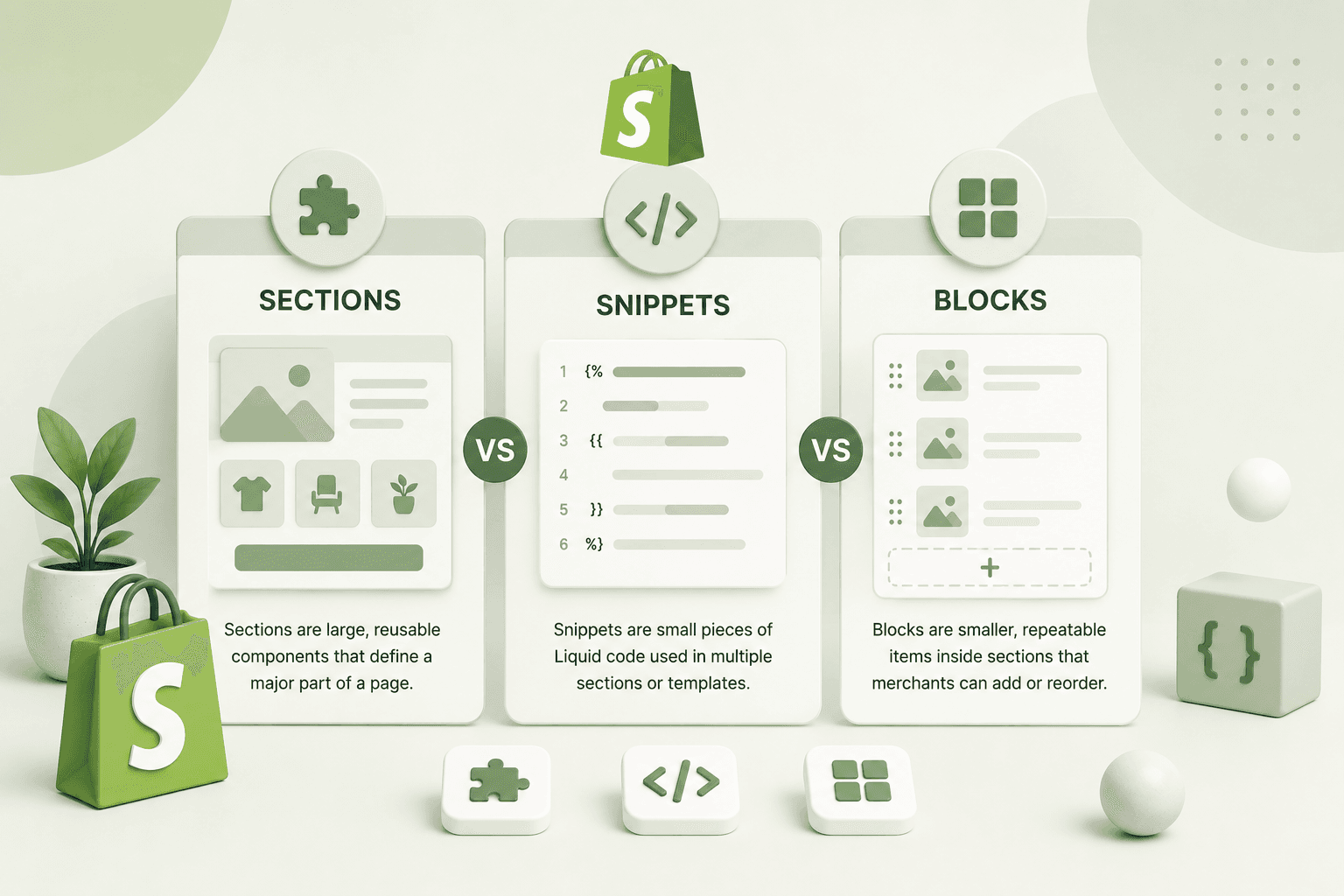
Quick Difference: Sections vs Snippets vs BlocksBefore going deeper, here's the simple explanation:
| Feature | Sections | Snippets | Blocks |
|---|---|---|---|
| Reusable | Yes | Yes | Yes |
| Can appear in Theme Editor | Yes | No | Inside supported sections |
| Can have settings | Yes | No direct schema settings | Yes |
| Usually represents | A complete page component | A reusable piece of markup | A configurable piece inside a section |
| Typical location | sections/ |
snippets/ |
Defined inside sections |
The easiest way to remember them is:
- Section: A larger, configurable component that can be added or arranged on a page.
- Snippet: A reusable piece of Liquid markup that you can render from other Liquid files.
- Block: A smaller configurable component that lives inside a section and can usually be reordered or managed from the theme editor.
Why Shopify Store Speed Matters
What Is a Shopify Section?A Shopify section is a reusable theme component that can contain Liquid, HTML, CSS, JavaScript, and a schema that defines settings for the Shopify theme editor.
Sections are commonly used for larger pieces of a page such as:
- Hero banners
- Featured products
- Image banners
- Testimonials
- Newsletter forms
- Product information
- Collection grids
- Promotional banners
- Custom content areas
For example, imagine that you want to create a custom promotional banner that a store owner can add to the homepage.
You could create:
sections/custom-promo-banner.liquidInside the file, you might have:
<section class="custom-promo-banner">
    <div class="page-width">

        <h2>
            {{ section.settings.heading }}
        </h2>

        <p>
            {{ section.settings.description }}
        </p>

    </div>
</section>
Then you can define settings through the section schema.
{% raw %}{% schema %}
{
  "name": "Custom Promo Banner",
  "settings": [
    {
      "type": "text",
      "id": "heading",
      "label": "Heading"
    },
    {
      "type": "textarea",
      "id": "description",
      "label": "Description"
    }
  ],
  "presets": [
    {
      "name": "Custom Promo Banner"
    }
  ]
}
{% endschema %}{% endraw %}
The important part is that the section can expose configuration through the Shopify theme editor instead of requiring a developer to change the Liquid code every time the content needs to change.
Why Shopify Store Speed Matters
What Is a Shopify Snippet?A Shopify snippet is a reusable piece of Liquid markup that can be rendered from other Liquid files.
Snippets are particularly useful when you have a small component that needs to be used in multiple places.
Common examples include:
- Product cards
- Price displays
- Icons
- Badges
- Rating displays
- Buttons
- Reusable markup
- Small UI components
Suppose your theme needs to display a product price in several different locations.
Instead of repeating the same markup everywhere, you could create:
snippets/product-price.liquidThen render it from another Liquid file:
{% raw %}{% render 'product-price', product: product %}{% endraw %}This gives you one reusable implementation instead of copying the same markup into multiple templates and sections.
Why Shopify Store Speed Matters
Why Are Snippets Useful?Imagine you have the following product card displayed on your homepage, collection page, search results, and recommendation section.
If the product card markup is copied into every file, changing the card later means updating multiple locations.
With a snippet, you can keep the reusable component in one place:
snippets/product-card.liquidThen render it wherever needed:
{% raw %}{% render 'product-card', product: product %}{% endraw %}This is one of the most practical uses of snippets in Shopify theme development.
Why Shopify Store Speed Matters
What Is a Shopify Block?A Shopify block is a configurable component that belongs to a section.
Blocks are useful when you want a section to contain multiple pieces of content that the merchant can add, remove, or reorder through the theme editor.
For example, imagine a "Why Choose Us" section containing:
- Free Shipping
- Easy Returns
- Secure Payments
- 24/7 Support
Instead of creating four separate hard-coded elements, you can
create a block type such as feature.
A simplified example could look like this:
{% raw %}{% for block in section.blocks %}
    <div class="feature" {{ block.shopify_attributes }}>

        <h3>
            {{ block.settings.title }}
        </h3>

        <p>
            {{ block.settings.text }}
        </p>

    </div>
{% endfor %}{% endraw %}
The schema can define the block:
{% raw %}{% schema %}
{
  "name": "Features",
  "blocks": [
    {
      "type": "feature",
      "name": "Feature",
      "settings": [
        {
          "type": "text",
          "id": "title",
          "label": "Title"
        },
        {
          "type": "textarea",
          "id": "text",
          "label": "Description"
        }
      ]
    }
  ],
  "presets": [
    {
      "name": "Features"
    }
  ]
}
{% endschema %}{% endraw %}
Now the merchant can manage multiple feature blocks from the theme editor without editing the Liquid file.
Why Shopify Store Speed Matters
Sections vs SnippetsThe biggest difference between a section and a snippet is how the component is managed and reused.
Sections
Sections are designed to represent larger theme components and can expose settings and blocks through their schema.
A section might represent an entire hero area:
sections/hero-banner.liquidThe merchant can then configure the section through the theme editor.
Snippets
Snippets are smaller reusable pieces of Liquid code. They are generally controlled by the code that renders them rather than being directly added as standalone components through the theme editor.
A product card is a good example:
snippets/product-card.liquidIt can then be rendered from multiple sections.
Why Shopify Store Speed Matters
Sections vs BlocksSections and blocks are closely related because blocks normally exist within sections.
Think about it like this:
Section
│
├── Block
├── Block
├── Block
└── Block
The section provides the overall structure while the blocks provide individual pieces of configurable content.
For example:
Testimonials Section
│
├── Testimonial Block
├── Testimonial Block
└── Testimonial Block
The merchant can then change the number and order of testimonials without a developer manually changing the Liquid file.
Why Shopify Store Speed Matters
Can a Snippet Have Shopify Theme Editor Settings?A snippet does not work like a section with its own schema and standalone theme-editor configuration.
If a reusable component needs merchant-configurable settings, it is often better to define those settings on the parent section or block and pass the values into the snippet.
For example, a section can have a setting:
{% raw %}{{ section.settings.button_text }}{% endraw %}and then pass that value to a snippet:
{% raw %}{% render 'custom-button',
    text: section.settings.button_text,
    url: section.settings.button_url
%}{% endraw %}
This creates a useful separation between configuration and reusable markup.
Why Shopify Store Speed Matters
How Sections, Blocks and Snippets Work TogetherIn a well-structured Shopify theme, you don't necessarily have to choose only one of these approaches.
You can use all three together.
For example, imagine a featured products section:
Featured Products Section
│
├── Product Block
│   └── Product Card Snippet
│
├── Product Block
│   └── Product Card Snippet
│
└── Product Block
    └── Product Card Snippet
Here:
- The section controls the overall layout.
- The blocks control the individual items.
- The snippet handles reusable product-card markup.
This type of separation can make a theme much easier to maintain.
Why Shopify Store Speed Matters
When Should You Use a Section?Use a section when you are building a relatively complete component that should be configurable or manageable through the Shopify theme editor.
Good examples include:
- Hero banners
- Featured collection sections
- Testimonials
- Image-with-text sections
- Promotional banners
- Newsletter sections
- Custom product information
If the merchant should be able to add the component to a page and configure it visually, a section is often the right starting point.
Why Shopify Store Speed Matters
When Should You Use a Snippet?Use a snippet when you have a small piece of markup or Liquid logic that needs to be reused from multiple places.
Good examples include:
- Product cards
- Price components
- Icons
- Badges
- Reusable buttons
- Small navigation components
- Repeated Liquid logic
If you're copying the same block of Liquid into several files, that's often a signal that the code could become a snippet.
Why Shopify Store Speed Matters
When Should You Use a Block?Use blocks when a section needs multiple configurable items that merchants can add, remove, or reorder.
Blocks work especially well for:
- Testimonials
- Feature lists
- FAQs
- Slides
- Benefits
- Product highlights
- Content cards
- Navigation items
If you find yourself creating the same HTML structure repeatedly inside a section, consider whether that structure should become a block.
Why Shopify Store Speed Matters
A Real-World ExampleLet's say you're building a custom Shopify homepage for a fashion store.
The homepage might contain:
Homepage
│
├── Announcement Bar
├── Hero Section
├── Featured Collection
│   ├── Product Block
│   ├── Product Block
│   └── Product Block
├── Image With Text
├── Testimonials
│   ├── Testimonial Block
│   ├── Testimonial Block
│   └── Testimonial Block
└── Newsletter
Each major component can be a section.
Repeated items inside those sections can be blocks.
Reusable markup shared between components can be snippets.
This creates a clean separation between page structure, configurable content, and reusable code.
Why Shopify Store Speed Matters
Common Mistakes Developers Make1. Putting Everything in One Section
A common mistake is creating one extremely large Liquid file that contains the entire homepage.
Although this might work initially, it becomes difficult to understand and maintain as the project grows.
Break large components into logical sections and reusable snippets where appropriate.
2. Creating a Snippet for Everything
Reusability is good, but creating dozens of tiny snippets can also make a theme difficult to follow.
Don't extract every two lines of HTML into a separate file. Create snippets when there is a genuine reuse or separation-of-concerns benefit.
3. Hard-Coding Repeated Content Instead of Using Blocks
If a merchant needs to add or reorder items from the theme editor, hard-coding every item into Liquid defeats the purpose of a flexible Online Store 2.0 theme.
Consider using blocks when the content represents repeated, configurable items.
4. Using Generic CSS Classes
Custom Shopify sections often introduce CSS conflicts when generic selectors are used.
Instead of:
.title {
    font-size: 30px;
}
use a component-specific class:
.bbs-featured-products__title {
    font-size: 30px;
}
This reduces the chance of accidentally changing unrelated parts of the theme.
Why Shopify Store Speed Matters
Sections, Snippets and Blocks: A Simple Mental ModelIf you're still unsure which one to use, ask yourself three questions.
Question 1: Is this a complete page component?
If yes, consider a section.
Question 2: Is this a small reusable piece of Liquid markup?
If yes, consider a snippet.
Question 3: Does the section need multiple configurable items?
If yes, consider using blocks inside the section.
In many real projects, the final answer will involve more than one of them.
Why Shopify Store Speed Matters
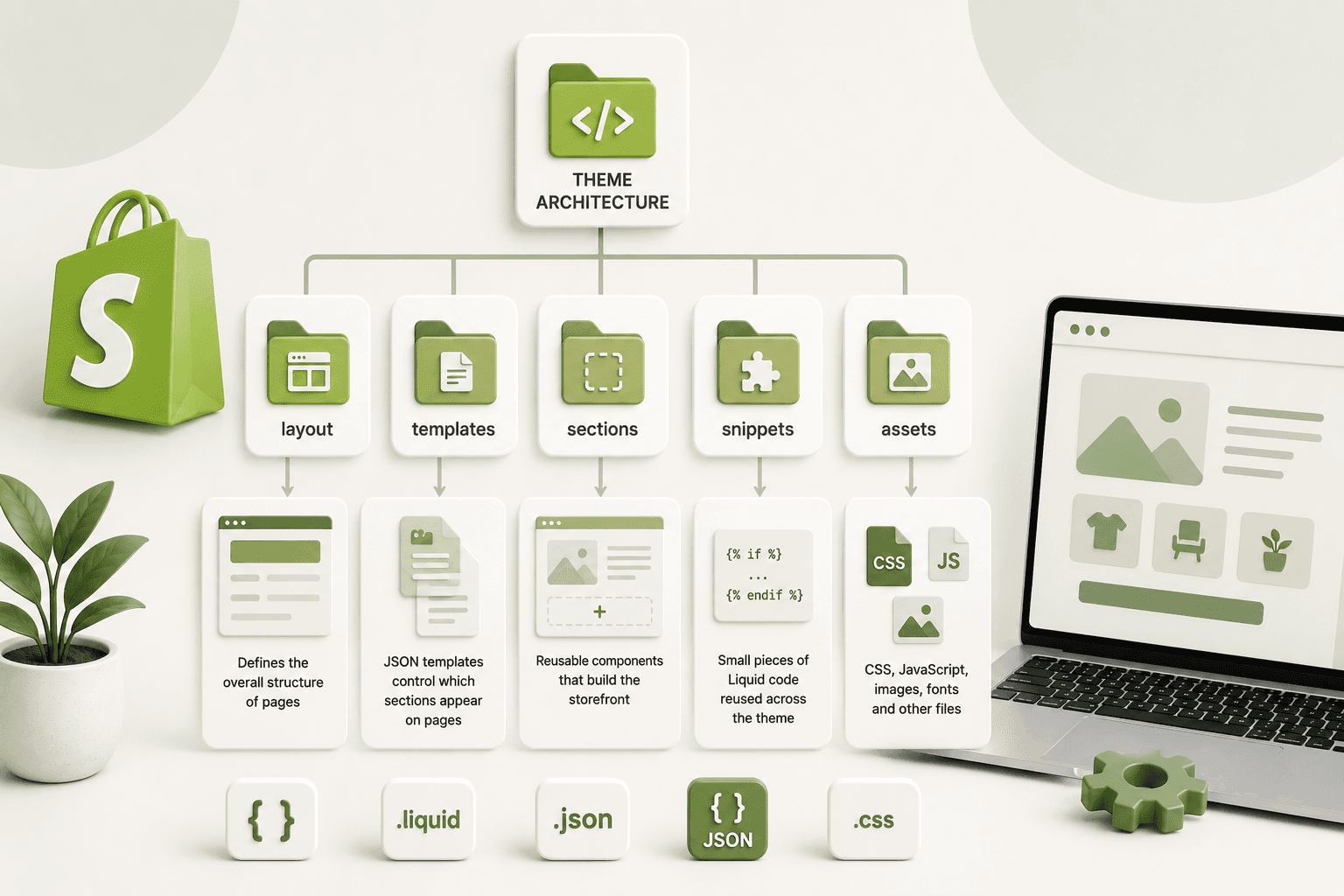
Recommended Shopify Theme StructureA clean theme might contain files organized like this:
sections/
    hero-banner.liquid
    featured-products.liquid
    testimonials.liquid
    image-with-text.liquid

snippets/
    product-card.liquid
    product-price.liquid
    icon-arrow.liquid
    button.liquid

templates/
    index.json
    product.json
    collection.json

assets/
    theme.css
    custom.js
The exact structure will vary depending on the theme and project, but the goal should always be the same: keep related functionality organized and avoid unnecessary duplication.
Why Shopify Store Speed Matters
How This Fits Into Shopify Online Store 2.0Shopify's Online Store 2.0 architecture made sections and blocks even more important for creating flexible storefronts.
JSON templates allow pages to define which sections should be rendered and how those sections are configured.
This makes it possible to build themes where merchants can change page composition without developers manually editing a template for every layout change.
If you're learning Shopify theme development today, understanding sections, blocks, JSON templates, and Liquid is therefore much more useful than simply memorizing individual theme files.
Why Shopify Store Speed Matters
Sections vs Snippets vs Blocks: Final Comparison| Use Case | Best Choice |
|---|---|
| Homepage hero | Section |
| Product card markup | Snippet |
| Multiple testimonials | Blocks inside a section |
| Reusable price markup | Snippet |
| Configurable promotional banner | Section |
| FAQ items | Blocks inside a section |
| Reusable icon markup | Snippet |
| Configurable image-with-text component | Section |
Why Shopify Store Speed Matters
Frequently Asked QuestionsWhat is the difference between a Shopify section and a snippet?
A section is generally a larger, configurable theme component that can be managed through Shopify's theme editor. A snippet is a reusable piece of Liquid markup that is rendered from other theme files and is useful for sharing smaller components or logic.
What is a block in Shopify?
A Shopify block is a configurable component that belongs to a section. Blocks are useful when a merchant needs to add, remove, or reorder multiple similar items inside a section.
Can a Shopify section contain snippets?
Yes. Sections can render snippets. This is a common development pattern when a section contains reusable markup that is also needed elsewhere in the theme.
Can a Shopify section contain blocks?
Yes. Sections can define supported block types in their schema and render the blocks using Liquid. This allows merchants to manage repeated content through the theme editor.
Should I use sections or snippets for reusable components?
It depends on the component. Use a section when the component needs to be managed as a configurable page-level component. Use a snippet when you need reusable Liquid markup inside other theme files. If the component contains repeated configurable items, blocks may be appropriate within the section.
Are Shopify sections and blocks the same thing?
No. A section is the larger container or component, while blocks represent configurable items within that section. A section can contain multiple blocks.
Why should Shopify developers use snippets?
Snippets reduce duplicated Liquid markup and make shared components easier to maintain. If the same piece of code appears in several places, putting the reusable logic into a snippet can make future changes much easier.
Why Shopify Store Speed Matters
Final ThoughtsSections, snippets, and blocks are not competing technologies. They solve different problems and are often most powerful when used together.
Think of a section as the larger component, a block as a configurable item inside that component, and a snippet as reusable Liquid markup that can be shared across different parts of the theme.
Once you understand this distinction, Shopify theme development becomes much easier to structure. Instead of putting everything into one template or repeating the same Liquid code across multiple files, you can create components that are reusable, configurable, and easier to maintain.
If you're building Shopify themes professionally, this way of thinking becomes especially important as stores become more customized. A well-structured theme doesn't just work today—it should also make future changes easier for the next developer and the store owner.
The simple rule to remember is: sections define larger components, blocks define configurable items inside sections, and snippets keep reusable Liquid code organized.