Shopify metafields are one of the most powerful features available to Shopify store owners and developers when a standard product, collection, customer, or order field is not enough. They allow you to extend Shopify's existing data model with additional information that is specific to your business, products, customers, or storefront experience.
For example, a Shopify product normally contains information such as its title, description, price, images, variants, inventory, and other standard commerce data.But what if you also need to display product dimensions, material information, care instructions, ingredients, warranty details, size guides, technical specifications, downloadable files, product badges, shipping information, or other custom content?
This is where Shopify metafields become extremely useful.
Instead of putting every piece of information into the product description, you can create dedicated custom fields and display each value exactly where it makes sense in your Shopify theme or custom storefront.
Shopify describes metafields as a way to extend existing platform data models such as products, customers, and orders with custom data. Shopify also provides metafield definitions that specify the structure, type, and validation rules for that data.
In this complete guide, we will cover everything you need to know about Shopify metafields, including metafield definitions, namespaces and keys, data types, product metafields, variant metafields, collection metafields, Liquid implementation, dynamic sources, Shopify Storefront API access, GraphQL, custom storefronts, practical examples, common mistakes, SEO considerations, and how developers can use metafields to build more flexible Shopify stores.
What Are Shopify Metafields?
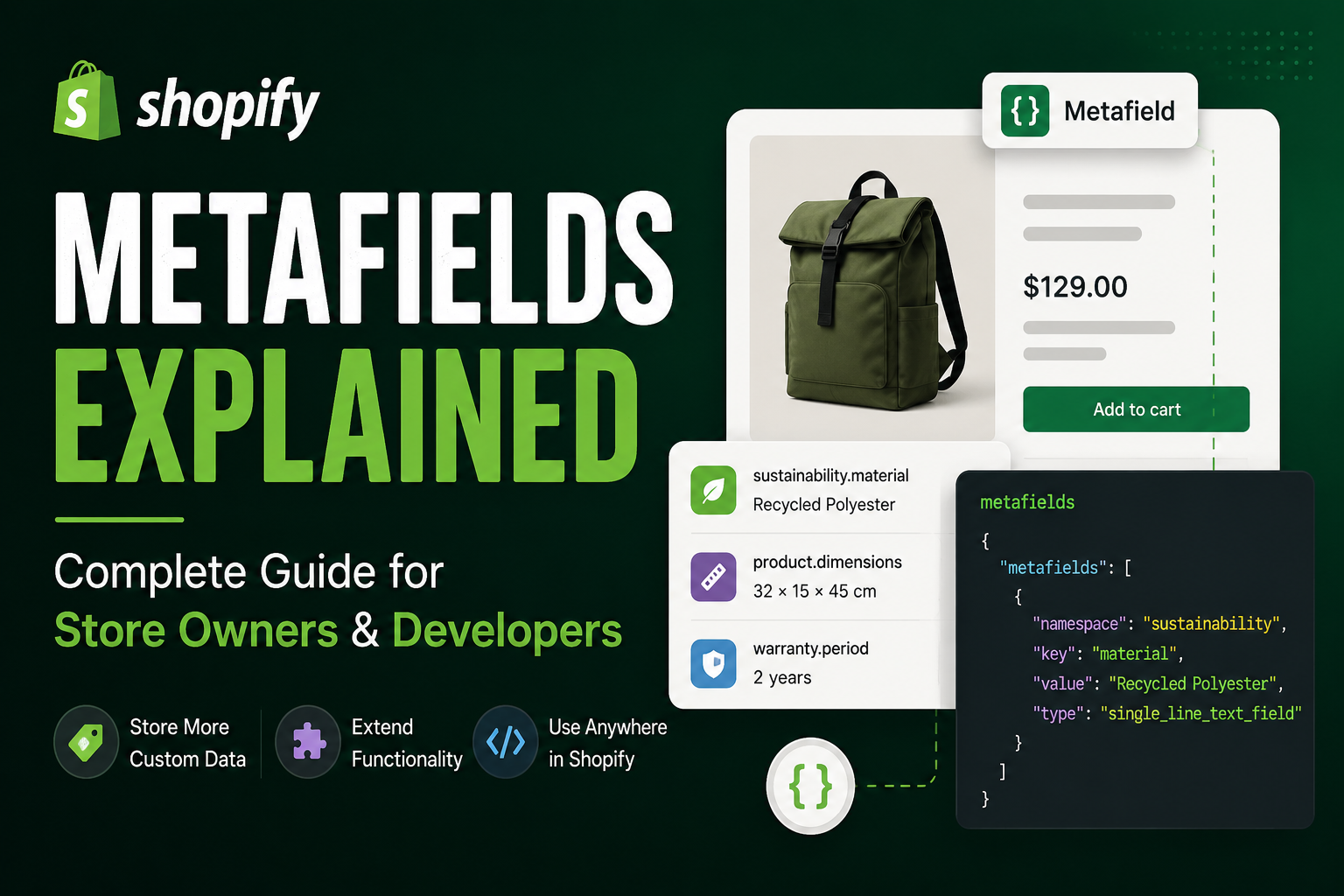
A Shopify metafield is a custom data field attached to an existing Shopify resource.
Think of a metafield as an additional property that you can add to something that already exists in Shopify.
For example, suppose you sell skincare products. Shopify already provides standard product fields such as:
- Product title.
- Product description.
- Product images.
- Price.
- Variants.
- Inventory.
- Vendor.
- Product type.
You may also want to store:
- Skin type.
- Key ingredients.
- How to use.
- Product benefits.
- Texture.
- Fragrance information.
- SPF rating.
- Dermatologist information.
- Product certification.
- Product size guide.
These additional values can be stored using Shopify metafields rather than being manually hard-coded into your theme.
This makes the store much easier to manage because merchants can update structured information directly from Shopify admin without asking a developer to modify the theme code every time product information changes.
Shopify metafields let you extend Shopify's standard data model with structured custom information. They are especially useful when the standard product or collection fields do not provide enough flexibility.
Why Shopify Metafields Are Important
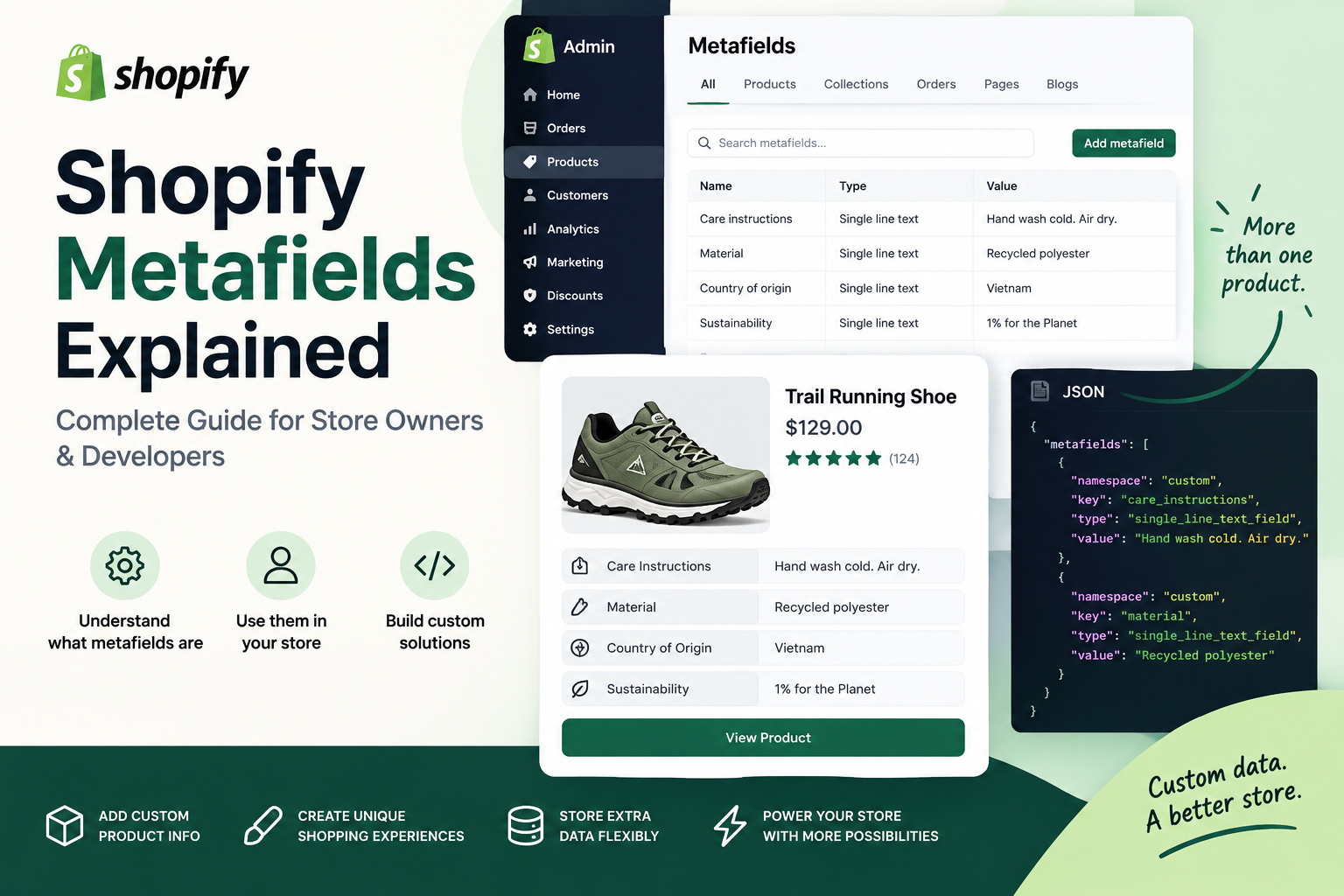
A Shopify store can technically be built without custom metafields, but as the catalog and business requirements become more complex, metafields can become extremely valuable.
Without metafields, developers often end up putting custom information directly into theme code or product descriptions.
That approach can create several problems.
- Merchants cannot easily manage structured information.
- Product pages become difficult to maintain.
- Content becomes inconsistent between products.
- Developers need to make frequent code changes.
- Different product types become difficult to support.
- Reusable storefront components become harder to build.
With properly designed metafield definitions, you can create structured fields that can be reused throughout your catalog.
Shopify recommends using standard metafield definitions whenever an appropriate standard definition exists because standard definitions are designed for compatibility across Shopify's ecosystem, including themes and apps.
Shopify Metafields vs Product Descriptions
One of the most common questions from Shopify store owners is whether they should use metafields or simply add the information to the product description.
The answer depends on the type of information.
A product description is generally useful for long-form marketing content describing the product.
Metafields are more useful when information needs to be structured, reusable, separately editable, or displayed in a specific location.
For example, consider a furniture store.
The product description might explain the design and benefits of a sofa.
Metafields could store:
- Material.
- Width.
- Height.
- Depth.
- Weight.
- Assembly requirements.
- Warranty period.
- Care instructions.
The theme can then display these values in dedicated specification sections instead of forcing customers to search through a large block of description text.
Shopify Metafield Definitions
A metafield definition describes what a metafield is, where it applies, what type of data it accepts, and which validation rules should be applied.
Shopify currently supports both standard metafield definitions and custom metafield definitions.
Standard definitions are provided by Shopify and are intended to be compatible across the platform.
Custom definitions are useful when Shopify does not provide a standard definition that matches your specific business requirement.
A metafield definition can include information such as:
- Name.
- Namespace.
- Key.
- Description.
- Data type.
- Validation rules.
- Access settings.
What Is a Shopify Metafield Namespace and Key?
Every structured metafield is identified using a namespace and key.
The namespace helps group related metafields, while the key identifies the specific field.
A common example is:
custom.materialHere, custom is the namespace and material is the key.
Another example might be:
custom.care_instructionsThis could represent a product's care instructions.
Shopify's documentation describes namespace and key together as the unique identifier for a metafield.
Common Shopify Metafield Types
Choosing the correct metafield type is important because the type determines what kind of information can be stored and how the value can be used.
Depending on the definition and Shopify's supported data types, metafields can represent values such as:
- Single-line text.
- Multi-line text.
- Rich text.
- Integer.
- Decimal.
- Boolean.
- Date.
- Date and time.
- URL.
- File.
- Color.
- Rating.
- Weight.
- Volume.
- Dimension.
- Product references.
- Collection references.
- Page references.
- Metaobject references.
The available choices depend on the specific Shopify data model and current platform capabilities.
Product Metafields
Product metafields are among the most commonly used metafields in Shopify stores.
They allow merchants to add custom information to individual products.
Common product metafield examples include:
- Product specifications.
- Materials.
- Ingredients.
- Care instructions.
- Size guides.
- Warranty information.
- Shipping information.
- Product badges.
- Technical specifications.
- Downloadable manuals.
- Video URLs.
- Additional product images.
Shopify itself provides examples such as care instructions, recommended ages, potential hazards, and product dimensions as useful applications for metafields.
Variant Metafields
Sometimes the custom information belongs to a specific product variant rather than the entire product.
For example, imagine a clothing store selling a jacket in several sizes.
If every variant has the same material and care instructions, those values could belong to the product.
But if each variant has different technical information, dimensions, or other variant-specific attributes, variant metafields may be more appropriate.
Choosing the correct owner type is an important part of Shopify data modeling.
Collection Metafields
Collection metafields allow developers to store custom information associated with collections.
For example, a collection could have:
- Collection introduction.
- Banner image.
- SEO-focused supporting content.
- Buying guide URL.
- Collection badge.
- Promotional message.
- Featured content.
This can be especially useful when building custom collection templates where different collections need different supporting content.
Customer Metafields
Shopify also supports metafields for customer-related data.
Depending on your use case and Shopify's current permissions and APIs, customer metafields can be used to store additional information relevant to a customer relationship.
Examples may include:
- Customer preferences.
- Membership information.
- Customer profile attributes.
- Business-specific identifiers.
Because customer data can be sensitive, developers should carefully consider access control, privacy, and data minimization when designing customer metafields.
Order Metafields
Order-related metafields can be useful when a business needs to attach additional structured information to orders.
For example, a business may need internal reference information or workflow-related data that is not represented by Shopify's standard order fields.
When working with order data, developers should ensure that API permissions and privacy requirements are properly configured.
Shopify Category Metafields
Shopify's category metafields are another important part of Shopify's structured product data model.
Category metafields are connected to Shopify's Standard Product Taxonomy and can provide attributes appropriate to specific product categories.
For example, apparel categories may have attributes such as:
- Size.
- Color.
- Fabric.
- Neckline.
- Target gender.
- Age group.
Shopify notes that category metafields can help products become more discoverable across storefronts, marketplaces, and search experiences.
Category metafields can also be useful for product filtering and variant options such as color swatches.
How to Create a Shopify Metafield
Creating a Shopify metafield is straightforward when you understand the data you need to store.
In Shopify admin, metafield definitions are managed from the custom data settings.
A typical workflow is:
- Open Shopify admin.
- Go to Settings.
- Open Metafields and metaobjects.
- Select the resource, such as Products.
- Click Add definition.
- Choose a suitable standard definition if one exists.
- Otherwise create a custom definition.
- Choose the appropriate data type.
- Add validation rules where necessary.
- Configure access if a custom storefront needs the data.
- Save the definition.
Shopify's current documentation confirms that custom metafield definitions are created from Settings > Metafields and metaobjects, followed by selecting the resource and adding a definition.
How to Choose the Right Metafield Type
One of the most important decisions when creating a metafield is choosing the correct data type.
Suppose you need to store a product's warranty period.
You could store it as text:
2 YearsBut if your business needs to perform calculations or validation, a numeric value may be more appropriate.
Similarly, a URL should normally use a URL-type field instead of a generic text field.
A product relationship should use a product reference instead of manually storing a product handle as plain text.
Good data modeling makes your Shopify store easier to maintain and gives developers more flexibility later.
Shopify Metafield Validation
Metafield definitions can include validation rules.
Validation helps prevent inconsistent values from being entered into your store.
For example, you might require:
- A minimum numeric value.
- A maximum numeric value.
- A specific text length.
- A valid URL.
- A specific format.
Shopify's documentation describes validation rules as a way to define constraints such as minimum and maximum values or character limits.
Don't create every metafield as generic text. Choose the most meaningful data type available for the information you are modeling. Better data structures make storefront development, validation, filtering, and integrations easier.
How to Display Shopify Metafields in Liquid
Shopify theme developers frequently access metafields using Liquid.
A product metafield can be accessed through the product object's metafields collection.
A common pattern looks like:
{{ product.metafields.custom.material.value }}
For example, if your namespace is custom and your key is material, the Liquid code can
retrieve the value through the product object.
The exact output depends on the metafield type.
Example: Product Material Metafield
Suppose you create a product metafield:
Namespace: custom


        Key: material
        Type: Single-line text
You can display it in a Shopify theme using:
<div class="product-material">


             Material:
            {{ product.metafields.custom.material.value }}
This allows every product to have its own material value without hard-coding the information into the theme.
Example: Product Care Instructions
Another common Shopify metafield use case is care instructions.
{{ product.metafields.custom.care_instructions.value }}You could display this inside an accordion or product information section.
<details>
 Care Instructions
</details >

{{ product.metafields.custom.care_instructions.value }}
This creates a reusable component that works across products.
Using Metafields With Shopify Theme Editor
One of the biggest advantages of Shopify metafields is that they can be connected to compatible theme settings and sections through Shopify's dynamic source functionality.
This can allow merchants to connect product or collection data to theme components without manually editing Liquid for every piece of content.
For example, a product page could have a custom text block connected to a product metafield such as:
custom.materialThen different products can automatically display their own material information.
This approach can make Shopify stores significantly easier for non-technical merchants to manage.
Shopify Metafields and Dynamic Sources
Dynamic sources allow Shopify theme settings to use data stored elsewhere in Shopify.
Instead of creating a separate hard-coded section for every product, you can create a reusable section and connect its settings to product metafields.
This is particularly useful for Online Store 2.0 themes because merchants can build flexible page structures using reusable sections and blocks.
Shopify Metafields and Online Store 2.0
Shopify's Online Store 2.0 architecture made custom data significantly more useful for theme development.
Modern Shopify themes can be designed around reusable sections, blocks, templates, and dynamic sources.
Metafields can act as the structured data layer behind these components.
For example, a custom product section could display:
- Product specifications.
- Ingredients.
- Materials.
- Size information.
- Warranty.
- Shipping details.
The same section can then work across hundreds or thousands of products.
Shopify Metafields for Product Specifications
Product specifications are one of the best use cases for metafields.
Consider an electronics store selling laptops.
You might create:
custom.processor
custom.ram
custom.storage
custom.screen_size
custom.battery
custom.operating_system
Your theme can then display these fields in a structured specifications table.
This is much better than manually creating specification HTML for every product.
Shopify Metafields for Product Badges
Metafields can also be used to control product badges.
For example:
custom.badgeValues might include:
- New Arrival.
- Best Seller.
- Limited Edition.
- Staff Pick.
- Trending.
Your Liquid code can then conditionally display the badge.
{% raw %}
    {% if product.metafields.custom.badge.value != blank %}
        {{ product.metafields.custom.badge.value }}
    {% endif %}
{% endraw %}
This provides a simple way to give merchants control over product presentation.
Shopify Metafields for Product Videos
Another useful application is storing additional media or video information.
A merchant may want to associate a product with:
- Product demonstration video.
- Installation video.
- Tutorial.
- Unboxing video.
- Instructional content.
Depending on the required implementation, this information can be modeled using appropriate file, URL, or reference fields.
Shopify Metafield Lists
Shopify also supports metafield lists, which allow multiple values to be stored in a single metafield.
This is useful for information such as:
- Multiple ingredients.
- Multiple related products.
- Multiple files.
- Multiple links.
- Multiple collections.
- Multiple product references.
- Multiple metaobject references.
Shopify's current documentation lists multiple supported list types and reference types, including products, variants, files, pages, blog posts, collections, and metaobjects.
Shopify Metafields vs Metaobjects
This is one of the most important distinctions developers need to understand.
Metafields are generally used to add individual custom fields to an existing Shopify resource.
Metaobjects are useful when you need to create a structured object containing multiple related fields.
For example, suppose you want to store a simple product material.
A metafield may be enough:
custom.materialBut suppose you want to create a reusable "Product Highlight" object containing:
- Icon.
- Title.
- Description.
- Image.
- Link.
A metaobject may be a better data model.
Shopify describes metaobjects as a way to create custom data structures containing multiple fields, while metafields extend existing resources with additional fields.
Don't use metafields for everything. If the data represents a reusable structured entity with several related fields, a Shopify metaobject may provide a cleaner and more scalable architecture.
Shopify Metafields and the Storefront API
Metafields become particularly important when building headless Shopify stores and custom storefronts.
A custom frontend such as a React or Next.js application may need to retrieve product metafields from Shopify.
Shopify allows metafield definitions to be configured for Storefront API access when the data needs to be exposed to a custom storefront. Shopify notes that custom metafields are not automatically accessible to custom storefronts by default.
This is an important consideration when building a headless Shopify architecture.
Shopify Metafields With GraphQL
Modern Shopify development frequently uses GraphQL for API-based data access.
Metafield definitions themselves are represented in Shopify's Admin GraphQL API, where definitions describe the owner type, namespace, key, type, validation, and access-related configuration.
A developer working on a custom Shopify application may therefore interact with metafields programmatically rather than managing every value manually through Shopify admin.
Using Shopify Metafields in Next.js
Headless Shopify storefronts built with Next.js can use Shopify's APIs to retrieve structured product information and render it in custom components.
For example, a product page could retrieve metafields for:
- Materials.
- Ingredients.
- Specifications.
- Warranty information.
- Product guides.
- Additional media.
The Next.js application can then render those values inside custom UI components.
This is one of the reasons metafields are important for headless commerce: they provide a structured data layer that is independent from the presentation layer.
If you're planning a custom Shopify storefront or headless commerce project, you can explore the Shopify Development service or React & Next.js Development service.
Shopify Metafields for Custom Product Tabs
A common Shopify theme customization is adding product tabs or accordions.
Instead of hard-coding the content, you can create metafields such as:
custom.ingredients
custom.shipping_information
custom.warranty
custom.care_instructions
Your product template can then display each field in its own accordion.
This creates a scalable product page architecture where merchants control the content from Shopify admin.
Shopify Metafields for Size Guides
Size guides are another excellent example.
Different product categories may require different size information.
Instead of adding the same size guide to every product description, you can create structured data and connect the appropriate size guide to each product or category.
For more complex relationships, metaobjects and reference-type metafields can provide a more flexible architecture.
Shopify Metafields for SEO
Metafields can support SEO workflows, but it is important to understand what they do and what they do not do.
A metafield itself is not a magic Shopify SEO ranking factor.
Instead, metafields can help developers build better structured pages and content management systems.
For example, metafields could store supporting content such as:
- Product FAQs.
- Buying guide content.
- Technical specifications.
- Additional product information.
- Supporting media.
That information can then be rendered into useful page content where appropriate.
The SEO benefit comes from the quality, relevance, accessibility, and usefulness of the resulting page—not simply from having a metafield.
Can Metafields Improve Shopify SEO?
Indirectly, yes.
Metafields can help you create richer and more structured product pages, but adding a metafield does not automatically improve Google rankings.
For example, a product page containing meaningful specifications, useful FAQs, clear product information, and relevant supporting content may provide a better experience than a page containing only a generic description.
The important part is how the data is actually used on the storefront.
Shopify Metafields and Structured Data
Developers can use structured product information to help generate appropriate structured data, provided the resulting markup accurately represents visible and relevant page information.
For example, a product's structured information might use values from Shopify's product data and relevant custom data.
However, structured data should never be generated simply to add keywords that are not genuinely represented on the page.
Shopify Metafields for Product Filtering
Custom data can also play an important role in product discovery.
Depending on Shopify's available filtering capabilities and how the metafields are configured, structured product attributes can help merchants build more useful filtering experiences.
For example, a clothing store may need filters for:
- Material.
- Color.
- Fit.
- Style.
- Pattern.
Category metafields can be particularly useful when the attribute belongs naturally to a Shopify product category.
Shopify Metafields for Custom Shopify Themes
Custom Shopify theme development is one of the strongest use cases for metafields.
A developer can create reusable Liquid sections that read custom data from products, collections, or other supported resources.
This allows the theme to remain reusable while the content remains editable from Shopify admin.
For example, instead of creating ten different product templates for ten product types, you may be able to build a flexible product template that conditionally displays different metafield-driven sections.
If you need custom Shopify theme development, Liquid customization, sections, blocks, or Shopify performance optimization, visit the Shopify Development service.
Conditional Rendering With Shopify Metafields
Developers can conditionally render sections depending on whether a metafield contains a value.
{% raw %}
    {% if product.metafields.custom.warranty.value != blank %}
        Warranty
        {{ product.metafields.custom.warranty.value }}
    {% endif %}
{% endraw %}
This pattern is extremely useful because it prevents empty sections from appearing on products where the information has not been provided.
Shopify Metafield Reference Types
Reference-type metafields allow you to connect custom data to other Shopify resources instead of storing only plain text.
Depending on the supported configuration, you can create references to resources such as:
- Products.
- Variants.
- Collections.
- Pages.
- Files.
- Metaobjects.
This is particularly powerful when building related content systems.
For example, a product could reference a related buying guide or a collection of recommended products rather than simply storing a text URL.
Shopify Metafields for Related Products
Suppose you sell fashion products and want to recommend matching accessories.
You could use a product reference or a list of product references to associate related products.
The storefront can then render these products dynamically.
This is more maintainable than manually editing a product description whenever a related product changes.
Shopify Metafield Lists for Ingredients
Imagine a cosmetics store with dozens of ingredients per product.
A metafield list can represent multiple values more naturally than one large text field.
For example:
custom.ingredientscould contain multiple ingredient values.
The storefront can then iterate over those values and display them as a structured list.
Shopify Metafields for B2B Stores
Metafields can also be useful in B2B commerce when additional business-specific data needs to be stored.
Depending on the Shopify architecture and requirements, custom data can help represent information that is not directly captured by standard fields.
Examples might include:
- Internal product codes.
- Technical specifications.
- Sales information.
- Customer-specific attributes.
- Documentation links.
For advanced B2B implementations, developers should model the data carefully rather than creating large numbers of unrelated fields.
Shopify Metafields for International Stores
International stores may have additional content requirements.
When designing custom data for multilingual or multi-market stores, consider whether a metafield needs to support translated content and how that information will be presented across markets.
Do not assume that every custom data field should be treated as globally identical.
How Many Shopify Metafields Should You Create?
There is no benefit to creating dozens of metafields simply because Shopify allows custom data.
Every field should have a clear purpose.
Before creating a metafield, ask:
- What information am I storing?
- Who will manage it?
- Where will it be displayed?
- Does Shopify already provide a standard field?
- Does a standard metafield definition exist?
- Should this be a metafield or metaobject?
- What data type is appropriate?
- Does the custom storefront need access?
- Will this information be used for filtering?
Shopify currently documents a limit of up to 250 metafield definitions, but practical architecture should focus on maintainability rather than simply reaching platform limits.
Common Shopify Metafield Mistakes
Metafields are powerful, but poor data modeling can make a Shopify project unnecessarily complicated.
Creating Everything as Text
One common mistake is storing every value as generic text.
If something is actually a URL, number, date, product reference, file, or structured object, use the appropriate type when possible.
Ignoring Standard Definitions
Before creating a custom metafield, check whether Shopify already provides a standard definition that fits your use case.
Standard definitions are designed for compatibility across Shopify's ecosystem.
Creating Too Many Metafields
More fields do not automatically mean a better store.
Create a data model that is easy for merchants and developers to understand.
Using Metafields for Structured Objects
If you have multiple related fields that represent a reusable entity, consider whether a metaobject is a better choice.
Forgetting Storefront API Access
This is especially important for headless Shopify projects.
Custom storefronts may require explicit access configuration for custom metafields.
Shopify Metafields and Performance
Metafields themselves should not be treated as a reason to make a page slow.
However, developers should still be thoughtful about how much data they request and render.
In a headless application, avoid requesting large amounts of custom data if the page does not use it.
In a Shopify theme, avoid rendering large amounts of unnecessary content into every product page.
Performance optimization should always consider the actual data required by the page.
Shopify Metafields and Large Product Catalogs
For stores with hundreds or thousands of products, structured metafields can make catalog management much more scalable.
Instead of manually editing theme code for individual products, merchants can manage product-specific values directly from the Shopify admin.
This becomes especially valuable when multiple people are managing the catalog.
Shopify Metafields for Product Templates
Metafields can also help create flexible product templates.
For example, a single template could support different products by conditionally displaying sections based on available custom data.
A product with a warranty metafield can display a warranty section.
A product with a size guide reference can display a size guide.
A product with ingredients can display an ingredients section.
This reduces the need to maintain large numbers of nearly identical templates.
Shopify Metafields and Custom Apps
Shopify apps can also create and manage metafields programmatically.
Developers building custom Shopify apps may use the Admin GraphQL API to manage metafield definitions and values, subject to the appropriate API permissions.
This is useful for applications that need to create structured data automatically.
For example, a custom app could create product metadata based on information collected from another system.
Shopify Metafields in Headless Commerce
Headless Shopify stores often depend heavily on structured data.
When Shopify acts as the commerce backend and Next.js acts as the frontend, metafields provide a bridge between merchant-managed custom data and the custom user interface.
A content editor can update a metafield in Shopify admin while the Next.js storefront automatically retrieves and displays the updated value.
This separation of content management and presentation is one of the biggest benefits of headless commerce.
If you're interested in headless architecture, you can also read Headless Shopify: Why Use Next.js for Your Storefront.
Shopify Metafields for Custom Landing Pages
Metafields do not have to be limited to technical specifications.
They can also power marketing-focused storefront sections.
For example, a product could have:
- Marketing headline.
- Short benefit statement.
- Feature list.
- Video.
- Customer quote.
- Buying guide.
These fields can be used to create highly flexible product landing pages.
Shopify Metafields and Product Merchandising
Merchandising teams can use structured data to control how products appear throughout a storefront.
For example, custom data can help determine whether a product should display a particular badge, promotional message, feature, or related content.
This can reduce the need for developers to manually update storefront code for routine merchandising changes.
Best Practices for Shopify Metafields
Following a consistent data model can make your Shopify store easier to scale.
- Use standard Shopify definitions whenever they match your requirements.
- Use descriptive metafield names.
- Keep namespaces organized.
- Choose the correct data type.
- Add validation rules where appropriate.
- Write useful descriptions for merchants.
- Avoid duplicate metafields.
- Use reference types when relationships matter.
- Consider metaobjects for complex reusable structures.
- Only expose custom data to storefronts when required.
- Keep Liquid implementations defensive.
- Check for blank values before rendering optional sections.
- Document important custom data for development teams.
How Developers Should Plan a Shopify Metafield Architecture
A professional Shopify development project should not create metafields randomly throughout the development process.
Start with a data model.
For each custom field, define:
- Owner resource.
- Business purpose.
- Namespace.
- Key.
- Data type.
- Validation requirements.
- Admin usage.
- Storefront usage.
- API requirements.
- SEO relevance.
This makes the implementation much easier to maintain as the store grows.
Shopify Metafields Checklist
- Identify information that Shopify's standard fields do not cover.
- Check Shopify's standard metafield definitions first.
- Create a custom definition only when necessary.
- Choose an appropriate owner type.
- Choose the correct data type.
- Create a clear namespace and key.
- Add validation rules where useful.
- Add a clear description for merchants.
- Decide whether Storefront API access is required.
- Use dynamic sources where appropriate.
- Display values through Liquid or the Storefront API.
- Use conditional rendering for optional data.
- Consider references for related resources.
- Consider metaobjects for complex structures.
- Test the storefront on products with and without values.
- Document the data model.
Final Thoughts
Shopify metafields are much more than simple custom fields. When designed correctly, they become an important part of a Shopify store's content and data architecture.
For store owners, metafields make it possible to manage additional product and collection information without constantly modifying theme code.
For Shopify developers, they provide a structured way to build reusable product templates, custom sections, dynamic content, filtering experiences, product specifications, custom badges, product tabs, and advanced storefront functionality.
For headless developers, metafields provide an important bridge between Shopify's commerce backend and modern frontend frameworks such as React and Next.js.
The key is to use them intentionally. Choose the right data type, use standard definitions when appropriate, keep your namespace and key structure organized, consider metaobjects for complex data, and make sure custom storefronts have the access they require.
When metafields are combined with Shopify Liquid, Online Store 2.0 sections, dynamic sources, Shopify APIs, GraphQL, and modern frontend development, they can turn a basic Shopify store into a much more flexible and scalable commerce platform.
If you need help with Shopify metafields, custom Shopify theme development, Liquid development, Shopify API integration, Shopify performance optimization, or custom storefront functionality, explore the Shopify Development service by Built by Saurav.
If you're building a headless Shopify storefront using React or Next.js, you can also explore the React & Next.js Development service.
For a custom Shopify project, contact Saurav and discuss your store's requirements, data structure, storefront design, and development goals.
Frequently Asked Questions About Shopify Metafields
What are Shopify metafields?
Shopify metafields are custom data fields that extend Shopify's standard resources, such as products, customers, collections, and orders. They allow merchants and developers to store additional structured information that is not available through Shopify's standard fields.
What are Shopify metafields used for?
Shopify metafields can be used for product specifications, care instructions, ingredients, size guides, warranty information, product badges, technical details, additional media, related products, custom content, and many other business-specific requirements.
What is a Shopify metafield definition?
A metafield definition specifies the resource the metafield belongs to, its name, namespace, key, data type, validation rules, and other configuration. Definitions provide structure and consistency for custom data.
What is the difference between Shopify metafields and metaobjects?
Metafields extend an existing Shopify resource with individual custom fields. Metaobjects are better suited to structured reusable entities containing multiple related fields. For example, a product's material can be a metafield, while a reusable product highlight containing an icon, title, description, and image may be better represented as a metaobject.
Can I use Shopify metafields in Liquid?
Yes. Shopify theme developers can access supported metafield values through Liquid. For example, a product metafield
can be accessed using a pattern such as product.metafields.custom.material.value.
Can Shopify metafields be used in a custom Next.js storefront?
Yes. Shopify metafields can be exposed to custom storefronts through the appropriate Shopify APIs and access configuration. Custom metafield definitions may need Storefront API access enabled before a headless storefront can retrieve their values.
Are Shopify metafields good for SEO?
Metafields are not a direct guarantee of better Google rankings. However, they can help developers create richer, better-structured, and more useful product pages. SEO value comes from the quality and usefulness of the resulting storefront content rather than from simply creating metafields.
Can Shopify metafields improve product pages?
Yes. Metafields can be used to create structured product specifications, ingredients, care instructions, product highlights, size guides, warranty information, and other content that can make product pages more informative and easier to navigate.
Can I use metafields for product filtering?
Depending on the metafield type and Shopify's current filtering capabilities, structured product data can be used to support product discovery and filtering. Category metafields are particularly useful for standardized product attributes.
Should every Shopify store use metafields?
Not necessarily. Metafields are most useful when a store needs information beyond Shopify's standard fields or when custom data needs to be managed separately from descriptions and theme code.
What is the Shopify metafield namespace?
The namespace groups related metafields and works together with the key to uniquely identify a metafield. A common
custom namespace is custom, resulting in identifiers such as custom.material.
Can Shopify metafields contain multiple values?
Yes. Shopify supports metafield lists for several data types and reference types. Lists can be useful for multiple ingredients, related products, files, collections, pages, and other structured values.
Can Shopify metafields store product references?
Yes. Shopify supports reference-type metafields for resources such as products and other supported resources. Product reference lists can be useful for building related-product or recommendation systems.
Can Shopify metafields store images?
Depending on the selected metafield definition, file-based custom data can be used to associate media with Shopify resources. This can be useful for additional product images, downloadable files, guides, and other custom media.
How many Shopify metafields can I create?
Shopify currently documents a limit of up to 250 metafield definitions. However, the goal should be to create a clean and maintainable data model rather than creating fields simply because the platform supports them.
What is the difference between standard and custom Shopify metafields?
Standard metafield definitions are provided by Shopify and designed for broad compatibility across Shopify's ecosystem. Custom metafield definitions are created when a suitable standard definition does not exist or when a store needs specialized data.
Where can I create Shopify metafield definitions?
Shopify metafield definitions can be managed from Shopify admin under Settings > Metafields and metaobjects. You then select the resource, such as Products, and create or manage the appropriate definition.
Do Shopify metafields work with Online Store 2.0?
Yes. Shopify metafields work particularly well with modern Shopify theme architecture because merchants can connect custom data to compatible theme settings and dynamic sources. This makes it possible to create reusable sections that display product-specific information.
Should I use metafields or metaobjects?
Use a metafield when you need to add a specific field to an existing resource. Consider a metaobject when the information represents a reusable structured entity containing multiple related fields. The best choice depends on your data model and how the information will be reused.
Can Shopify developers create metafields through an API?
Yes. Shopify developers can work with metafield definitions and values programmatically through Shopify's APIs, including the GraphQL Admin API, when the app has the appropriate access scopes.
Can Shopify metafields be used in custom Shopify apps?
Yes. Custom Shopify apps can use metafields to store structured information associated with supported Shopify resources. This can be useful for apps that need to attach application-specific data to products, variants, customers, or other resources.
Do Shopify metafields affect website performance?
Metafields are primarily a data-modeling feature, but developers should still avoid requesting or rendering unnecessary data. In headless storefronts especially, API queries should request only the information needed by the page whenever practical.
Where can I get professional Shopify metafield development help?
If you need help designing Shopify metafields, building custom Liquid sections, creating Shopify themes, integrating Shopify APIs, developing headless storefronts, or optimizing an existing store, visit the Shopify Development service or contact Saurav to discuss your project.