Shopify has become one of the most popular platforms for building and managing e-commerce stores because it provides merchants with a powerful combination of storefront tools, product management, checkout functionality, payments, inventory management, analytics, and an extensive app ecosystem. But while Shopify provides the infrastructure, the quality of the storefront still depends heavily on how the theme is designed and developed.
That is where Shopify theme development with Liquid becomes important.
Liquid is Shopify's template language and is one of the core technologies used to build Shopify themes. It allows developers to dynamically display products, collections, customer information, cart data, theme settings, metafields, and other Shopify resources inside storefront templates.
A professionally developed Shopify theme is much more than changing colors, fonts, and images. A good theme should have a clean component structure, reusable sections, flexible theme settings, responsive layouts, optimized assets, accessible markup, strong performance, and a user experience designed around the store's business goals.
In this complete guide, we will explore Shopify theme development with Liquid, including Liquid syntax, objects, tags, filters, sections, blocks, snippets, templates, JSON templates, theme settings, metafields, Shopify APIs, JavaScript integration, performance optimization, SEO, responsive design, Shopify Online Store 2.0 architecture, debugging, and practical development workflows.
What Is Shopify Theme Development?
Shopify theme development is the process of designing and developing the customer-facing storefront of a Shopify store.
A Shopify theme controls how products, collections, navigation, content, promotional sections, cart interfaces, and other storefront elements are presented to customers.
Theme development can range from simple customization of an existing theme to completely custom Shopify theme development.
Typical Shopify theme development work includes:
- Custom homepage sections.
- Product page customization.
- Collection page customization.
- Custom navigation.
- Announcement bars.
- Product cards.
- Cart drawer customization.
- Custom promotional banners.
- Product badges.
- Metafield integration.
- Custom filters.
- Responsive layouts.
- Custom JavaScript functionality.
- Third-party app integration.
- Performance optimization.
- SEO improvements.
The goal should not simply be to make the store look different. The goal is to create a storefront that is fast, responsive, maintainable, accessible, and aligned with the brand and customer journey.
What Is Liquid?
Liquid is Shopify's template language used to dynamically generate storefront content.
Liquid was originally created by Shopify and is designed to be relatively simple and safe for rendering dynamic content.
Liquid allows developers to access Shopify data and decide what should be displayed on a page.
For example, a product template can use Liquid to display:
- Product title.
- Product description.
- Product price.
- Product images.
- Product variants.
- Availability.
- Vendor.
- Tags.
- Collections.
- Metafields.
A simple Liquid expression can look like this:
{{ product.title }}The expression tells Shopify to output the current product's title.
Liquid Syntax
Liquid primarily uses three important syntax concepts: objects, tags, and filters.
Liquid Objects
Objects contain data that can be displayed or used inside the template.
For example:
{{ product.title }}Here, product is an object and title is one of its properties.
Other common Shopify objects include:
productcollectioncartcustomershoprequestsettingssectionroutes
Liquid Tags
Tags are used to control logic and perform actions within Liquid templates.
A common example is an if statement:
{% if product.available %}

Product is available
{% else %}
Product is sold out
{% endif %}
Liquid also provides loops, variable assignments, rendering tags, case statements, comments, and other functionality.
Liquid Filters
Filters modify or transform values.
For example:
{{ product.title | upcase }}This transforms the product title into uppercase text.
Filters can also be chained:
{{ product.title | strip | escape }}Filters are extremely useful when formatting content, generating URLs, working with images, manipulating strings, and preparing values for output.
Understanding Shopify Theme Architecture
A Shopify theme contains multiple types of files that work together to generate the storefront.
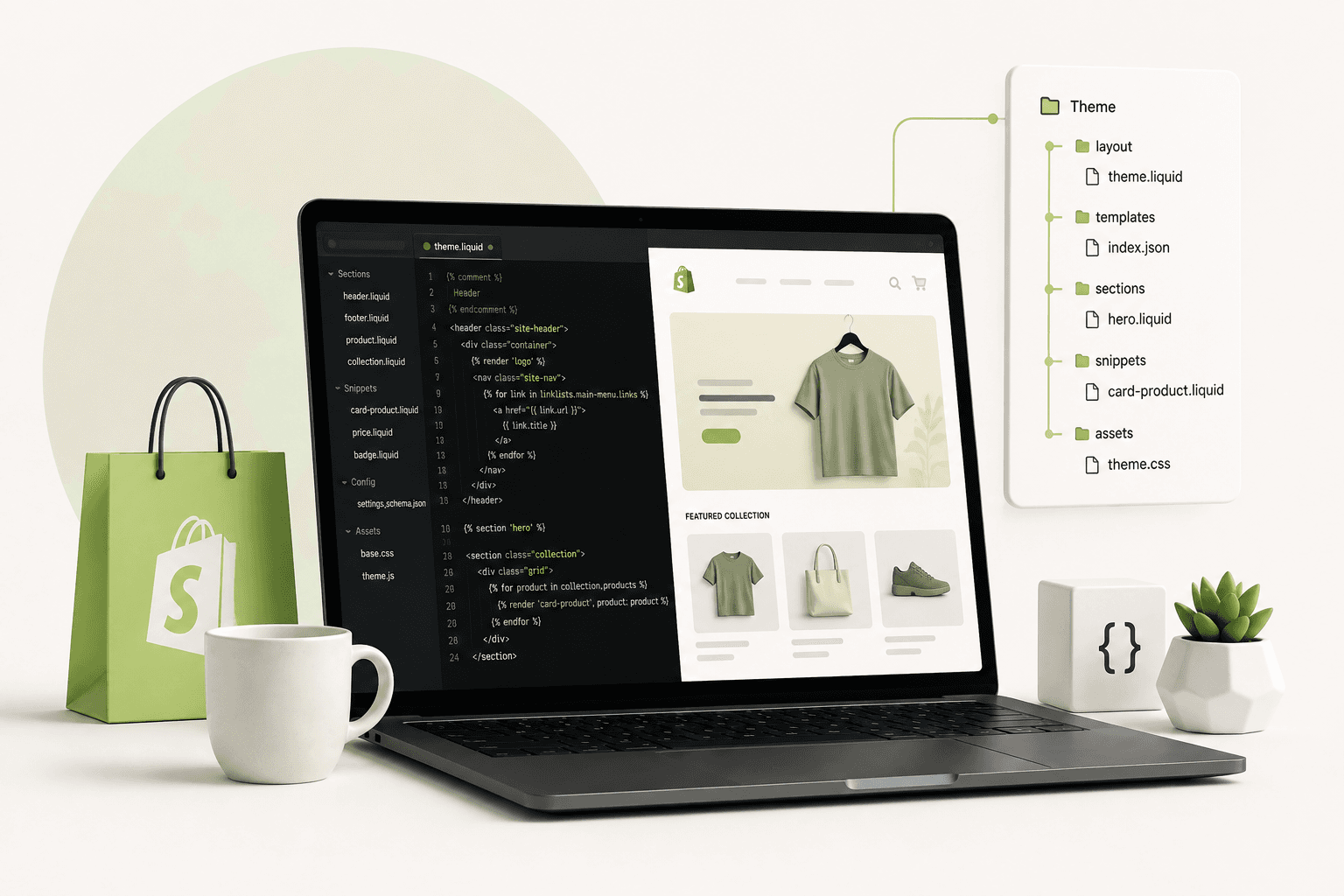
Modern Shopify themes commonly include directories such as:
assetsconfiglayoutlocalessectionssnippetstemplates
Understanding what each directory is responsible for is one of the first steps toward professional Shopify theme development.
The Layout Directory
The layout directory contains the main layout files used to provide the overall HTML structure of the storefront.
A common Shopify theme uses theme.liquid as the primary layout.
The layout generally contains the document structure, head elements, global assets, header, footer, and the location where page-specific content is rendered.
A simplified example can look like:
<!doctype html>


{{ content_for_header }}


{% sections 'header-group' %}

{{ content_for_layout }}

{% sections 'footer-group' %}
The exact structure depends on the theme architecture and Shopify features being used.
The Sections Directory
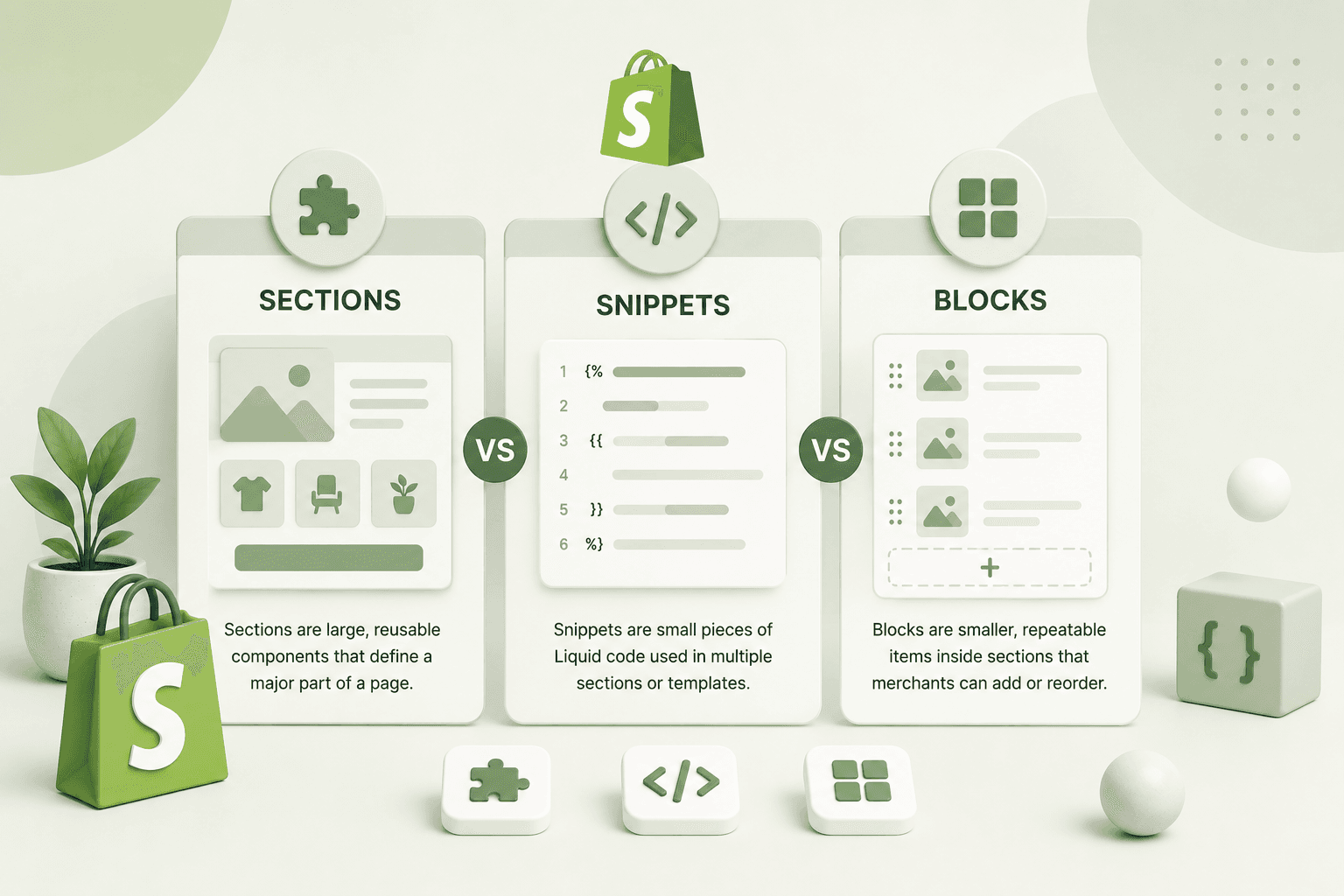
Sections are one of the most important parts of modern Shopify theme development.
A section is a reusable piece of storefront functionality that can be configured through the Shopify Theme Editor.
Examples include:
- Hero banner.
- Featured collection.
- Testimonials.
- Image with text.
- Product slider.
- Newsletter.
- Rich text.
- FAQ.
- Logo list.
- Promotional banner.
A section can contain Liquid, HTML, CSS, JavaScript, and a schema that defines its configurable settings.
Shopify Section Schema
The section schema controls what merchants can configure inside the Shopify Theme Editor.
A simplified example looks like:
{% schema %}

{
"name": "Custom Hero",
"settings": [
{
"type": "text",
"id": "heading",
"label": "Heading",
"default": "Welcome to our store"
}
]
}
{% endschema %}
The merchant can then change the heading without editing the Liquid code.
This separation between development logic and merchant-controlled content is one of the most important principles of scalable Shopify theme development.
Section Settings
Shopify provides several setting types that can be used to make sections configurable.
Common settings include:
- Text.
- Textarea.
- Rich text.
- Image picker.
- Color.
- URL.
- Checkbox.
- Range.
- Select.
- Collection picker.
- Product picker.
- Page picker.
For example, a hero section could provide settings for heading, description, image, button label, button link, alignment, and colors.
This gives merchants control without requiring a developer every time they want to update content.
Blocks in Shopify Themes
Blocks allow merchants to add and reorder individual pieces of content inside a section.
For example, a feature section could have a block for each feature:
{% for block in section.blocks %}


{{ block.settings.title }}
{{ block.settings.description }}

{% endfor %}
This architecture is extremely useful for flexible content sections because the merchant can add or remove blocks directly through the Theme Editor.
The Snippets Directory
Snippets are reusable pieces of Liquid code.
Instead of duplicating the same markup in multiple files, developers can place reusable code inside a snippet and render it wherever needed.
For example:
{% render 'product-card', product: product %}This can keep themes more maintainable and reduce code duplication.
Common snippets include:
- Product cards.
- Price components.
- Icons.
- Buttons.
- Pagination.
- Form components.
- Cart items.
- Badges.
Templates in Shopify
Templates determine the structure used for different types of Shopify pages.
Examples include:
- Product templates.
- Collection templates.
- Page templates.
- Blog templates.
- Article templates.
- Search templates.
- Cart templates.
Modern Shopify themes use JSON templates extensively, allowing merchants to customize which sections appear on a page.
JSON Templates
JSON templates are a major part of the modern Shopify theme architecture introduced with Online Store 2.0.
A JSON template can define which sections appear on a page and how those sections are configured.
This makes the storefront much more flexible than older theme architectures where page structure was more tightly coupled to Liquid templates.
For example, a product JSON template can contain references to product sections and define their settings.
This gives merchants greater control through the Shopify Theme Editor.
What Is Shopify Online Store 2.0?
Online Store 2.0 introduced a major modernization of Shopify's theme architecture.
One of its important goals was to provide merchants and developers with greater flexibility when building and customizing themes.
Key improvements included:
- JSON templates.
- Sections on more template types.
- Improved theme editor flexibility.
- App blocks.
- Better developer tooling.
- More flexible theme architecture.
Modern Shopify theme development should generally be designed around these capabilities rather than relying on older theme patterns unnecessarily.
Shopify Theme Development Workflow
A professional Shopify theme development workflow usually begins with understanding the store's requirements before writing code.
A practical workflow can look like this:
- Understand business requirements.
- Analyze the existing theme.
- Review the design system.
- Plan reusable components.
- Identify required sections.
- Define theme settings.
- Build Liquid structure.
- Implement responsive CSS.
- Add JavaScript interactions.
- Connect Shopify data.
- Test functionality.
- Optimize performance.
- Test SEO and accessibility.
- Deploy and monitor.
Planning the architecture before creating dozens of files can save significant development time later.
Shopify Theme Development with Shopify CLI
Shopify CLI is one of the most useful tools for professional Shopify theme development.
Instead of making every change directly inside the Shopify admin code editor, developers can work locally, use version control, preview changes, and synchronize theme files through Shopify's development workflow.
A local development workflow can make it easier to:
- Use Git.
- Review changes.
- Work with branches.
- Use a local editor such as VS Code.
- Debug code.
- Reuse development tooling.
- Collaborate with other developers.
For production Shopify projects, version control is strongly recommended because it makes changes easier to track and revert.
Using Git for Shopify Themes
Git can provide a reliable history of theme changes.
For example, a developer might maintain branches for:
- Production.
- Development.
- Feature work.
- Bug fixes.
This is particularly useful when multiple developers are working on the same store or when a merchant wants to safely test a major redesign before publishing it.
Working With Shopify Products in Liquid
Products are central to most Shopify stores.
Liquid provides access to product information that can be used to build custom product pages and product cards.
For example:
<h1>{{ product.title }}</h1>

    {{ product.description }}

    {{ product.price | money }}
Developers can also work with product variants, images, collections, tags, options, availability, and other product data.
Working With Product Variants
Many Shopify products have multiple variants such as size, color, material, or configuration.
A product page needs to provide customers with an intuitive way to select the appropriate variant.
Liquid can be used to output variant information, while JavaScript can handle dynamic interactions such as changing prices, images, availability, and variant IDs without requiring a complete page reload.
A well-designed variant selector should also consider accessibility, mobile usability, and clear feedback when a particular variant is unavailable.
Shopify Collections
Collections organize products into groups that customers can browse.
Liquid allows developers to access collection information and loop through products.
{% for product in collection.products %}
    {% render 'product-card', product: product %}
    {% endfor %}
Reusable product-card snippets are especially useful here because the same product presentation can be used throughout the storefront.
Working With the Shopify Cart
The cart is one of the most important parts of an e-commerce storefront.
Theme developers may customize the cart page or build an interactive cart drawer using Liquid, HTML, CSS, and JavaScript.
Modern storefronts commonly use asynchronous cart interactions so customers can add products without refreshing the entire page.
When implementing custom cart functionality, developers should carefully handle:
- Adding products.
- Updating quantities.
- Removing products.
- Variant IDs.
- Line item properties.
- Discount codes.
- Free gifts.
- Cart totals.
- Error handling.
- Loading states.
Cart functionality should be tested extensively because even small JavaScript errors can directly affect conversions.
Shopify Metafields
Metafields allow merchants to store additional structured information that is not covered by Shopify's standard resource fields.
For example, a store might use metafields for:
- Product specifications.
- Material information.
- Care instructions.
- Additional product details.
- Size guides.
- Ingredient information.
- Manufacturer information.
- Custom badges.
Metafields are extremely useful for custom Shopify themes because they allow content to be managed through Shopify Admin rather than hardcoded into Liquid templates.
Using Metafields in Liquid
Once a metafield is defined, it can be accessed through the relevant Shopify resource.
A simplified example is:
{{ product.metafields.custom.material }}The exact output depends on the metafield definition and data type.
For more complex storefronts, metafields can become an important part of the content architecture.
Metaobjects in Shopify
Metaobjects provide another way to create reusable structured content in Shopify.
They can be useful for content such as:
- Team members.
- Testimonials.
- FAQs.
- Store locations.
- Brand information.
- Product guides.
Instead of storing everything as hardcoded HTML, structured content can be managed through Shopify Admin and displayed dynamically within the theme.
Shopify Theme JavaScript
Liquid handles server-side template output, but modern Shopify storefronts often require JavaScript for interactive functionality.
Examples include:
- Sliders.
- Product variant selectors.
- Quick-add functionality.
- Cart drawers.
- Predictive search.
- Filters.
- Modal windows.
- Tabs.
- Accordions.
- Sticky add-to-cart bars.
The important principle is to use JavaScript where it improves the experience without unnecessarily increasing page weight.
Shopify AJAX Cart
Asynchronous cart interactions can make the shopping experience feel significantly faster.
Instead of navigating away from the current page after every cart action, JavaScript can communicate with Shopify's cart endpoints and update the interface dynamically.
A custom cart implementation should always provide clear visual feedback so customers know whether their action succeeded.
Shopify Theme CSS
CSS is responsible for turning the theme structure into a visually consistent storefront.
A professional Shopify theme should use a consistent design system covering:
- Typography.
- Colors.
- Spacing.
- Buttons.
- Forms.
- Cards.
- Responsive breakpoints.
- Animations.
Theme CSS should also be structured carefully to avoid excessive specificity and unnecessary duplication.
Responsive Shopify Theme Development
A Shopify store must work across desktop computers, tablets, and smartphones.
Mobile performance and usability are especially important for e-commerce because a significant portion of online shopping traffic can come from mobile devices.
Responsive Shopify development should consider:
- Touch-friendly controls.
- Readable typography.
- Appropriate image sizes.
- Mobile navigation.
- Product gallery behavior.
- Sticky elements.
- Cart interactions.
- Checkout entry points.
- Page speed.
Shopify Theme Performance Optimization
Theme performance can directly affect the customer experience and should be considered throughout development rather than only after the theme is complete.
Common optimization areas include:
- Image compression.
- Responsive images.
- Reducing JavaScript.
- Removing unused CSS.
- Limiting third-party scripts.
- Lazy-loading below-the-fold images.
- Prioritizing important content.
- Reducing unnecessary DOM elements.
- Using efficient Liquid logic.
- Auditing installed apps.
Performance optimization is particularly important for Shopify stores because third-party applications can add scripts and widgets that are outside the theme's core code.
If your existing Shopify store needs a technical performance review, you can explore the Shopify Development service by Built by Saurav.
Avoid Unnecessary JavaScript
One of the most common Shopify theme performance mistakes is adding JavaScript for functionality that could be implemented with simpler HTML and CSS.
For example, not every visual animation needs a large JavaScript library.
Before adding a dependency, ask whether the functionality can be implemented with modern CSS or lightweight JavaScript.
This approach can reduce page weight and improve maintainability.
Optimize Shopify Images
Images are often among the largest assets on an e-commerce website.
Product photography, hero banners, collection images, promotional graphics, and lifestyle images can all contribute to page weight.
Use appropriate image dimensions and Shopify's image transformation capabilities where applicable rather than delivering unnecessarily large images to mobile users.
For product photography specifically, you can also read our guide on photography tips for e-commerce product listings.
Lazy Loading in Shopify Themes
Lazy loading can prevent below-the-fold images from competing with important above-the-fold resources.
However, developers should avoid blindly lazy-loading every image.
The primary image contributing to the page's largest content element may need to load with higher priority, while images far below the initial viewport can generally be deferred.
Performance decisions should be based on how the page is actually rendered and used.
Shopify Theme SEO
A Shopify theme should provide a strong technical foundation for SEO.
Important theme-level SEO considerations include:
- Semantic HTML.
- Correct heading hierarchy.
- Unique page titles.
- Meta descriptions.
- Canonical URLs.
- Image alt text.
- Structured data.
- Internal linking.
- Mobile usability.
- Page performance.
SEO should not be treated as adding keywords to Liquid templates. Search engines need a technically accessible website with useful, relevant content and a strong information architecture.
Structured Data in Shopify
Structured data can help search engines understand information about a page.
For an e-commerce store, relevant structured data may include product information, organization information, breadcrumbs, articles, and other appropriate entities depending on the page.
Structured data should accurately represent the visible content on the page and should not be added simply to manipulate search results.
Shopify Product Schema
Product structured data can provide search engines with information about a product such as its name, image, description, brand, offers, and availability when the information is applicable and correctly implemented.
Shopify themes can generate this information dynamically using Liquid.
However, developers should test the final structured data rather than assuming that a theme's implementation is automatically correct.
Accessibility in Shopify Theme Development
Accessibility should be considered a core part of professional theme development.
Important areas include:
- Keyboard navigation.
- Semantic HTML.
- Accessible forms.
- Meaningful alt text.
- Visible focus states.
- Appropriate color contrast.
- Accessible buttons.
- ARIA only where appropriate.
- Accessible dialogs and menus.
A visually impressive storefront is not complete if customers cannot navigate or interact with important functionality using assistive technologies or keyboard controls.
Shopify Theme Customization vs Custom Theme Development
There is an important difference between customizing an existing Shopify theme and building a custom theme.
Theme customization generally involves modifying an existing architecture.
Custom Shopify theme development involves designing the architecture around the brand's specific requirements.
Customization can be more cost-effective when the existing theme already provides most required functionality.
A custom theme can be more appropriate when the store requires a unique experience, custom components, specialized product presentation, advanced interactions, or significant performance improvements.
When Should You Build a Custom Shopify Theme?
A custom theme may make sense when:
- The current theme has significant limitations.
- The brand requires a completely unique visual experience.
- The product presentation is highly specialized.
- The store requires custom interaction patterns.
- The current theme contains excessive legacy code.
- Performance needs significant improvement.
- The merchant needs highly flexible custom sections.
However, custom development should not be done simply for the sake of having custom code. A well-maintained existing theme can be a better solution when it already satisfies the business requirements.
Building Reusable Shopify Components
Reusable components are important for long-term theme maintainability.
Instead of creating separate markup for every product card, button, badge, or content block, identify patterns that can become reusable snippets or sections.
This approach helps maintain consistent behavior across the storefront.
For example, if the product card needs to change later, updating one reusable snippet can be much easier than editing ten different templates.
Avoid Hardcoding Merchant Content
Hardcoding content can make a theme difficult for merchants to manage.
Instead of writing:
<h2>Summer Collection</h2>a reusable section could provide a theme setting so the merchant can change the heading through Shopify Admin.
This is one of the key differences between a quick theme customization and a scalable Shopify theme implementation.
Shopify App Blocks
Modern Shopify themes can support app blocks, allowing compatible apps to provide content or functionality that merchants can place within supported theme sections.
This can improve integration between themes and apps while reducing the need for developers to manually hardcode every application integration into theme templates.
When building a custom theme, developers should consider how app functionality will coexist with the theme architecture.
Third-Party Shopify Apps and Theme Performance
Shopify's app ecosystem is one of the platform's major strengths, but every additional app should be evaluated carefully.
Apps may introduce:
- JavaScript.
- CSS.
- External network requests.
- Widgets.
- Tracking scripts.
- DOM elements.
Installing many apps without reviewing their impact can eventually create a storefront that is slower and harder to maintain.
Before installing an app, consider whether the functionality can be implemented natively or through lightweight custom development.
Shopify Theme Testing
Testing should happen throughout development rather than only before launch.
Important areas to test include:
- Desktop layouts.
- Mobile layouts.
- Different browsers.
- Product variants.
- Cart functionality.
- Forms.
- Navigation.
- Search.
- Collection filters.
- Theme settings.
- App integrations.
- Accessibility.
- SEO.
- Performance.
Testing should also include edge cases such as products with no images, unavailable variants, empty collections, empty carts, long product titles, missing metafields, and products with unusual option combinations.
Debugging Shopify Liquid
Liquid errors can prevent sections or templates from rendering correctly, so debugging skills are essential for Shopify developers.
When debugging Liquid, check:
- Object availability.
- Variable names.
- Condition logic.
- Loop behavior.
- Filter syntax.
- Section settings.
- Snippet parameters.
- JSON syntax.
- Schema configuration.
Break complex Liquid logic into smaller pieces rather than creating extremely large nested conditions.
Liquid Performance Considerations
Liquid itself is designed to render Shopify storefront data efficiently, but developers should still avoid unnecessarily complicated theme logic.
Keep templates understandable, avoid excessive duplication, and use reusable components where appropriate.
More importantly, remember that overall storefront performance is influenced by much more than Liquid. Images, JavaScript, CSS, third-party apps, network requests, and browser execution can all have a significant effect.
Shopify Theme Development and Core Web Vitals
Core Web Vitals provide useful metrics for understanding real-world website experience.
The current Core Web Vitals include:
- LCP: Largest Contentful Paint.
- INP: Interaction to Next Paint.
- CLS: Cumulative Layout Shift.
Shopify theme developers should pay particular attention to large hero images, product galleries, JavaScript-heavy app integrations, layout shifts, and slow-loading third-party resources.
For a deeper explanation, read How to Optimize Core Web Vitals for Better SEO Rankings.
Shopify Theme Security
Security should also be considered when developing custom Shopify themes.
Never assume that user-provided content is safe to insert into HTML without appropriate handling. Use Shopify's recommended escaping and output practices where required.
Developers should also avoid exposing private credentials or API secrets inside theme JavaScript or Liquid files.
Private credentials should never be embedded into frontend code because anything delivered to the browser can potentially be inspected by users.
Shopify APIs and Theme Development
Liquid can handle many storefront requirements, but advanced Shopify projects may require APIs.
Depending on the use case, Shopify provides APIs and platform capabilities that can be used to build custom applications, integrations, and headless storefront experiences.
GraphQL is particularly important for modern Shopify application development because it allows developers to request the fields they actually need from supported APIs.
If your project requires custom Shopify application development, API integrations, webhooks, or advanced storefront functionality, a theme may be only one part of the overall architecture.
Liquid vs JavaScript
Liquid and JavaScript serve different purposes in Shopify themes.
Liquid is primarily used to generate server-rendered storefront markup and access Shopify data.
JavaScript is used for browser-side interaction and dynamic behavior after the page has loaded.
A good theme developer understands where each technology should be used.
Do not use JavaScript to solve a problem that Liquid can solve efficiently, and do not try to force Liquid to perform functionality that belongs in the browser.
Building a Custom Hero Section
A hero section is a common example of reusable Shopify theme architecture.
A professionally developed hero section might allow the merchant to configure:
- Desktop image.
- Mobile image.
- Heading.
- Description.
- Primary button.
- Secondary button.
- Text alignment.
- Overlay.
- Section spacing.
This creates a reusable section that can be used across multiple pages without duplicating the underlying code.
Custom Shopify Product Sections
Product pages can contain much more than the standard product information.
Custom sections can be used for:
- Product benefits.
- Size guides.
- Ingredients.
- Shipping information.
- Customer reviews.
- Frequently asked questions.
- Comparison tables.
- Product videos.
- Trust badges.
Metafields and metaobjects can make these sections dynamic and manageable from Shopify Admin.
Custom Shopify Collection Pages
Collection pages need to balance product discovery with performance.
A well-designed collection page may include:
- Collection title.
- Collection description.
- Product grid.
- Sorting.
- Filtering.
- Pagination or progressive loading.
- Product cards.
- Promotional content.
Filters should be easy to use on mobile and should not create unnecessary client-side work.
Custom Shopify Navigation
Navigation is one of the most important components of an e-commerce store because customers use it to discover products and categories.
Custom navigation can include:
- Mega menus.
- Featured collections.
- Promotional images.
- Product links.
- Category navigation.
- Mobile drawers.
Navigation should remain accessible and easy to operate across devices.
Shopify Theme Animations
Animations can improve perceived quality and make a storefront feel more polished.
However, animations should support the interface rather than distract from shopping.
Keep animations lightweight and respect user preferences such as reduced-motion settings where appropriate.
Heavy animation libraries should not be added simply for decorative effects when CSS can achieve the same result efficiently.
Shopify Theme Development Best Practices
Some of the most important Shopify theme development principles include:
- Use reusable sections and snippets.
- Keep merchant content configurable.
- Use meaningful semantic HTML.
- Build mobile-first interfaces.
- Optimize images.
- Minimize unnecessary JavaScript.
- Audit third-party apps.
- Use descriptive variable names.
- Keep Liquid logic readable.
- Use version control.
- Test edge cases.
- Consider accessibility.
- Test Core Web Vitals.
- Implement SEO fundamentals.
- Do not expose private credentials.
Common Shopify Theme Development Mistakes
Several mistakes appear repeatedly in poorly maintained Shopify themes.
Too Much Hardcoded Content
Hardcoding merchant-controlled content forces developers to make changes that could otherwise be handled through Shopify Admin.
Too Many App Scripts
Installing applications without auditing their performance impact can make storefronts slower.
Duplicated Liquid
Copying the same markup into multiple templates creates maintenance problems and makes future changes more difficult.
Poor Mobile Experience
A design that looks excellent on desktop but is difficult to use on mobile can directly affect sales.
Ignoring Performance Until Launch
Performance should be considered during development instead of attempting to fix every issue after the theme is complete.
How to Build a Production-Ready Shopify Theme
A production-ready Shopify theme should be treated as a complete software project rather than a collection of visual files.
Start by understanding the business goals, customer journey, product structure, design system, content requirements, and integrations.
Then create a component architecture that can support future changes.
Build reusable sections, snippets, settings, and blocks so the merchant can manage the storefront without constantly relying on developers.
Finally, test performance, accessibility, SEO, mobile responsiveness, browser compatibility, and business-critical functionality before publishing the theme.
Professional Shopify Theme Development
A Shopify theme should reflect the brand while also supporting the customer's path from discovery to purchase.
That means design and development need to work together.
A visually impressive homepage cannot compensate for a confusing product page, slow cart interaction, poor mobile navigation, or an inefficient checkout journey.
Professional Shopify development combines Liquid, HTML, CSS, JavaScript, Shopify data, responsive design, performance optimization, SEO, accessibility, and conversion-focused UX.
If you need a custom Shopify theme, theme customization, Liquid development, custom sections, Shopify integrations, or performance improvements, explore the Shopify Development service offered by Built by Saurav.
Shopify Theme Development Checklist
Before launching a custom Shopify theme, review the following checklist:
- Theme structure is organized.
- Sections are reusable.
- Snippets are used for repeated components.
- Theme settings are properly configured.
- Blocks work correctly.
- JSON templates are valid.
- Product pages work correctly.
- Collection pages work correctly.
- Cart functionality has been tested.
- Variant selection works correctly.
- Mobile layouts have been tested.
- Images are optimized.
- JavaScript is minimized where practical.
- Third-party apps have been reviewed.
- SEO metadata is correct.
- Structured data is valid.
- Accessibility has been reviewed.
- Core Web Vitals have been tested.
- Analytics and tracking are working.
- Production backups or version control are available.
Final Thoughts
Shopify theme development with Liquid is much more than writing a few template tags. It involves understanding Shopify's data model, theme architecture, Online Store 2.0, sections, blocks, snippets, templates, JSON configuration, metafields, metaobjects, JavaScript, CSS, performance, SEO, accessibility, and the merchant's business requirements.
Liquid provides the foundation for dynamically generating Shopify storefront content, while HTML, CSS, and JavaScript turn that content into a complete customer experience.
The best Shopify themes are flexible enough for merchants to manage, structured enough for developers to maintain, and optimized enough to provide a fast experience for customers.
If you are building a new Shopify store or improving an existing one, start with the architecture rather than immediately modifying individual elements. Identify reusable components, define the theme settings, structure your sections, use Shopify's native capabilities where possible, and keep performance in mind from the beginning.
For businesses that need custom Shopify theme development, Liquid development, custom sections, responsive storefronts, Shopify API integrations, or performance optimization, explore the Shopify Development service.
If you are planning a custom project and want to discuss your requirements, contact Saurav to discuss your Shopify storefront, theme, or e-commerce development goals.
Frequently Asked Questions
What is Shopify Liquid?
Shopify Liquid is a template language used to dynamically generate storefront content. It allows developers to access Shopify objects such as products, collections, carts, customers, settings, and metafields and output them within theme templates.
Is Liquid difficult to learn?
Liquid is relatively approachable compared with general-purpose programming languages because its primary purpose is template rendering. Developers familiar with HTML, JavaScript, programming logic, loops, conditions, and variables can generally learn the fundamentals quickly.
Can I build a complete Shopify store with Liquid?
Liquid is a core part of Shopify theme development, but a complete storefront also uses HTML, CSS, JavaScript, Shopify's theme architecture, configuration, and platform features. Advanced projects may additionally use Shopify APIs and apps.
What is Online Store 2.0?
Online Store 2.0 is Shopify's modern theme architecture that introduced capabilities such as JSON templates, more flexible sections, app blocks, and improvements to the theme development experience.
What are Shopify sections?
Sections are reusable theme components that can contain Liquid, HTML, CSS, JavaScript, and configurable schema settings. They allow merchants to customize storefront content through the Shopify Theme Editor.
What are Shopify snippets?
Snippets are reusable pieces of Liquid code. They are useful for components such as product cards, prices, buttons, icons, and other repeated pieces of storefront markup.
What are Shopify metafields?
Metafields allow merchants and developers to store additional structured information associated with Shopify resources such as products, collections, customers, and orders. They are particularly useful for custom storefront content.
Can Liquid improve Shopify SEO?
Liquid can be used to dynamically generate SEO-related content such as titles, descriptions, canonical URLs, image attributes, structured data, and other storefront markup. However, technical SEO also depends on content quality, site architecture, performance, indexing, links, and other factors.
Can Liquid be used with JavaScript?
Yes. Liquid can generate HTML and data that JavaScript can then use in the browser. This combination is commonly used for interactive product selectors, cart drawers, filters, sliders, search interfaces, and other dynamic storefront functionality.
Should I customize an existing Shopify theme or build a custom theme?
The right choice depends on the requirements. If an existing theme already provides most required functionality, customization can be faster and more cost-effective. A custom Shopify theme can make more sense when the store needs a unique experience, specialized functionality, significant performance improvements, or a completely different architecture.
Can Shopify themes be optimized for Core Web Vitals?
Yes. Shopify themes can be optimized by improving image delivery, reducing unnecessary JavaScript and CSS, minimizing third-party scripts, preventing layout shifts, optimizing important content, and reviewing theme and app performance.
Do Shopify apps affect theme performance?
They can. Shopify apps may add JavaScript, CSS, network requests, widgets, and tracking resources to a storefront. Reviewing unnecessary apps and their resource impact is an important part of Shopify performance optimization.
Can I use Shopify Liquid for a headless store?
Liquid is primarily used for Shopify's traditional theme-based storefront architecture. A headless storefront generally uses a separate frontend technology such as React or Next.js and communicates with Shopify through APIs.
How can I hire a Shopify Liquid developer?
If you need custom Shopify theme development, Liquid development, responsive storefront customization, custom sections, Shopify integrations, or performance improvements, you can explore the Shopify Development service or contact Saurav with your project requirements.